
How to Fix Duplicate Content on a Multi-City Service Website
An eight-step method to find near-identical city pages, decide which ones earn their place, and merge, rewrite or redirect the rest without losing what already ranks.
The Short Answer on Multi-City Duplicate Content
You fix a multi-city site's duplicate content by deciding, city by city, whether a page has something true and specific to say. Pages that do get rewritten with real local substance. Pages that do not get merged into a stronger page and redirected. Everything that remains gets a correct canonical tag and a clear place in the site structure.
Most multi-city service sites start the same way. Someone builds one good service page, copies it forty times, swaps the city name, and publishes. The pages look different to a person scanning the headline and nearly identical to a search engine reading the body. Rankings stall, Search Console reports pages as duplicates, and nobody is sure which URL Google is actually showing.
The good news is that this is fixable, and you do not need to delete your city strategy to do it. This guide explains why the problem happens, what Google does about it, and an eight-step method with a 30-day plan and honest rupee estimates. Nobody can promise a ranking outcome, but the method removes the self-inflicted damage.
Want a duplicate content audit of your site? Message our team on WhatsApp or call +91 88070 03902 with your website address and the cities you serve, and we will tell you honestly what to keep, rewrite and merge.
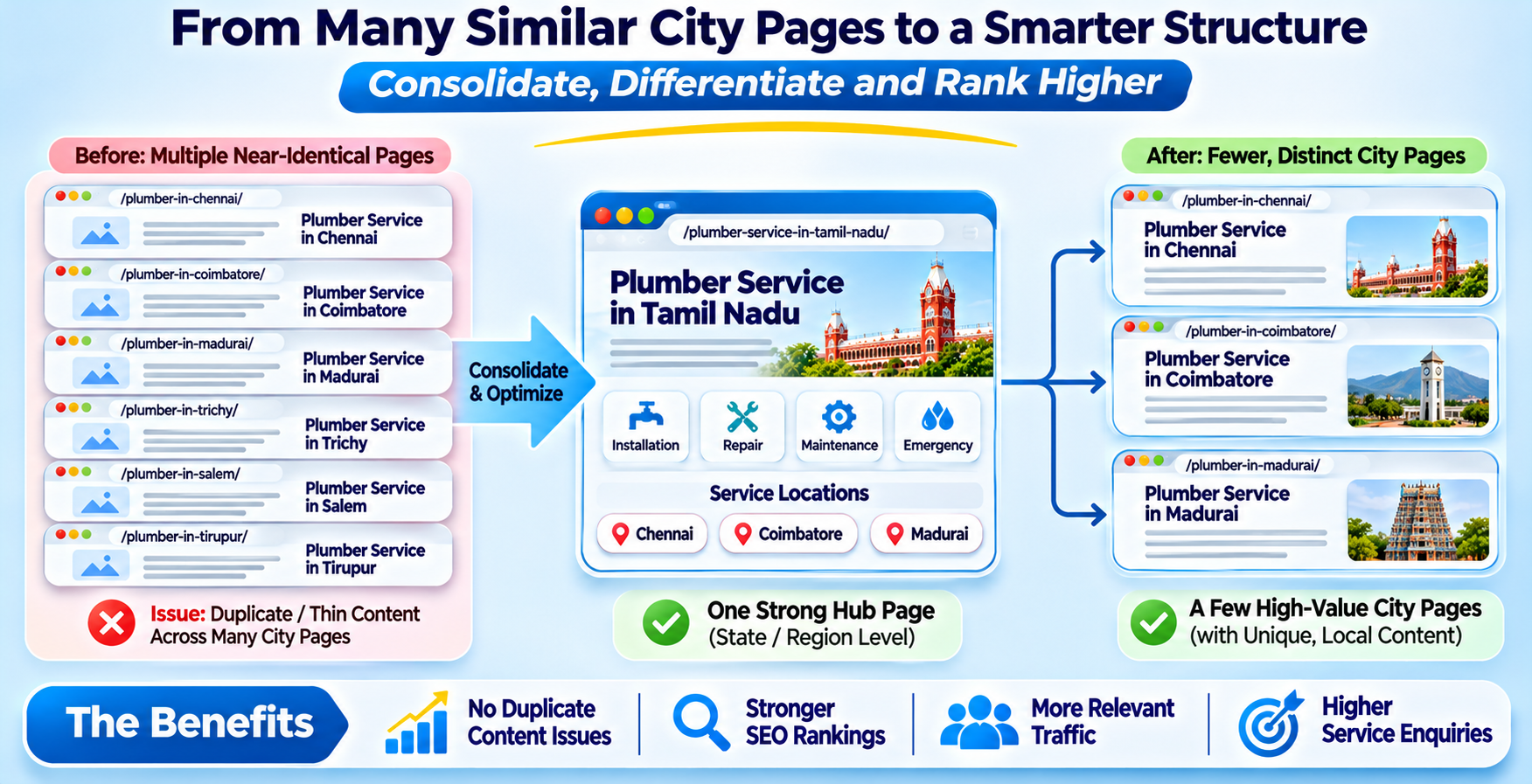
Why Multi-City Websites Create Duplicate Content (and How Google Treats It)
Duplicate content on a multi-city site comes from a few predictable habits.
- The swap-the-name template. One service page copied for every city with only the city name changed.
- Heavy shared boilerplate. Long identical blocks for services, process and FAQs, with a single unique line at the top.
- City and service combinations. Every service multiplied by every city, so a site with 8 services and 40 cities carries 320 pages built from the same few paragraphs.
- Technical duplicates. The same page reachable at http and https, with and without www, with and without a trailing slash, or with tracking parameters.
What Google Actually Does
Google does not hand out a blanket penalty for ordinary duplication. When it finds a set of duplicate or near-duplicate pages, it groups them and picks one as the canonical, the version it treats as most representative, as its canonicalization documentation explains. The cost to you is control: it may pick a different page than the one you wanted, index only a few of your city pages, and split the signals that point to them.
There is a second risk that is more serious. Google's spam policies cover doorway pages, which include multiple pages aimed at specific regions or cities that funnel users to the same destination. Large numbers of near-identical city pages built mainly to capture searches can fall into that category. Policies change, so read the current text rather than relying on a summary, including this one. That is how multi-city duplicate content turns from a nuisance into a risk.
Step 1: Find the Duplicates Before You Fix Anything
Do not start rewriting. Start by measuring, so you know which pages are a real problem and which only look like one.
- Read Search Console's Page indexing report. Look for statuses such as "Duplicate without user-selected canonical" and "Duplicate, Google chose different canonical than user". Each lists URLs Google has grouped.
- Crawl your own site. A crawling tool lists every URL with its title, heading, word count and canonical, which exposes template pages quickly.
- Compare the text. Copy the body of three city pages into a text comparison tool. If most of the text matches, the pages are near-duplicates.
- Search for a distinctive sentence. Put a quoted line from one city page in Google with your domain, and see how many of your pages carry it.
Put everything in a sheet with one row per URL: the city, the service, the word count, how much is unique, its traffic and enquiries if you have them, and its Search Console status. This sheet drives every later decision.
Step 2: Decide Which Cities Deserve Their Own Page
This is the decision that matters most. For every city page, ask one question: do we have something true and specific to say about serving this city that we would not say about the next one? If the honest answer is no, the page is a candidate for merging. This simple test is the quickest way to tame multi-city duplicate content without guessing.
| Signal | Keep as its own page | Merge into a stronger page |
|---|---|---|
| Real presence | Office, branch, team or regular service in that city | No presence, served remotely or rarely |
| Local proof | Projects, clients (with permission) or reviews from there | None to show |
| Local detail | Pricing, timelines, rules or conditions that really differ | Nothing differs from the next city |
| Demand | Real searches, enquiries or traffic for that city | No searches, no enquiries |
Take a hypothetical service company with 40 city pages. After this test it might keep 8 to 12 with real substance, merge the rest into regional pages, and mention the smaller cities in a clear list of areas served. Fewer, stronger pages are usually easier to maintain and easier for Google to understand.
Step 3: Rewrite City Pages with Real Local Substance
For the pages you keep, changing the city name is not enough. A good city page contains material that exists only because the work happens there. This is the heart of fixing the problem properly rather than hiding it.
- Real local proof. Named projects, photographs and reviews from that city, used with permission.
- Local specifics. Delivery timelines, travel arrangements, rules, seasons or conditions that genuinely differ in that place.
- The people. The team or partner who serves that city, with a name and role.
- Questions people there ask. Local FAQs drawn from real enquiries, not invented ones.
- Accurate contact details. A real address and phone number for that city if you have a presence there, and none if you do not.
Do not invent testimonials, fake addresses or made-up local statistics to fill space. That makes the problem worse and risks your reputation. If you cannot fill a page with true local material, return to Step 2: it is probably a page to merge. As a practical target, aim for most of the body on each kept page to be unique to that city, with only the shared service explanation repeated.
Step 4: Merge or Remove Pages That Cannot Be Made Unique
For the pages that failed the test, choose the right treatment for multi-city duplicate content instead of simply deleting them.
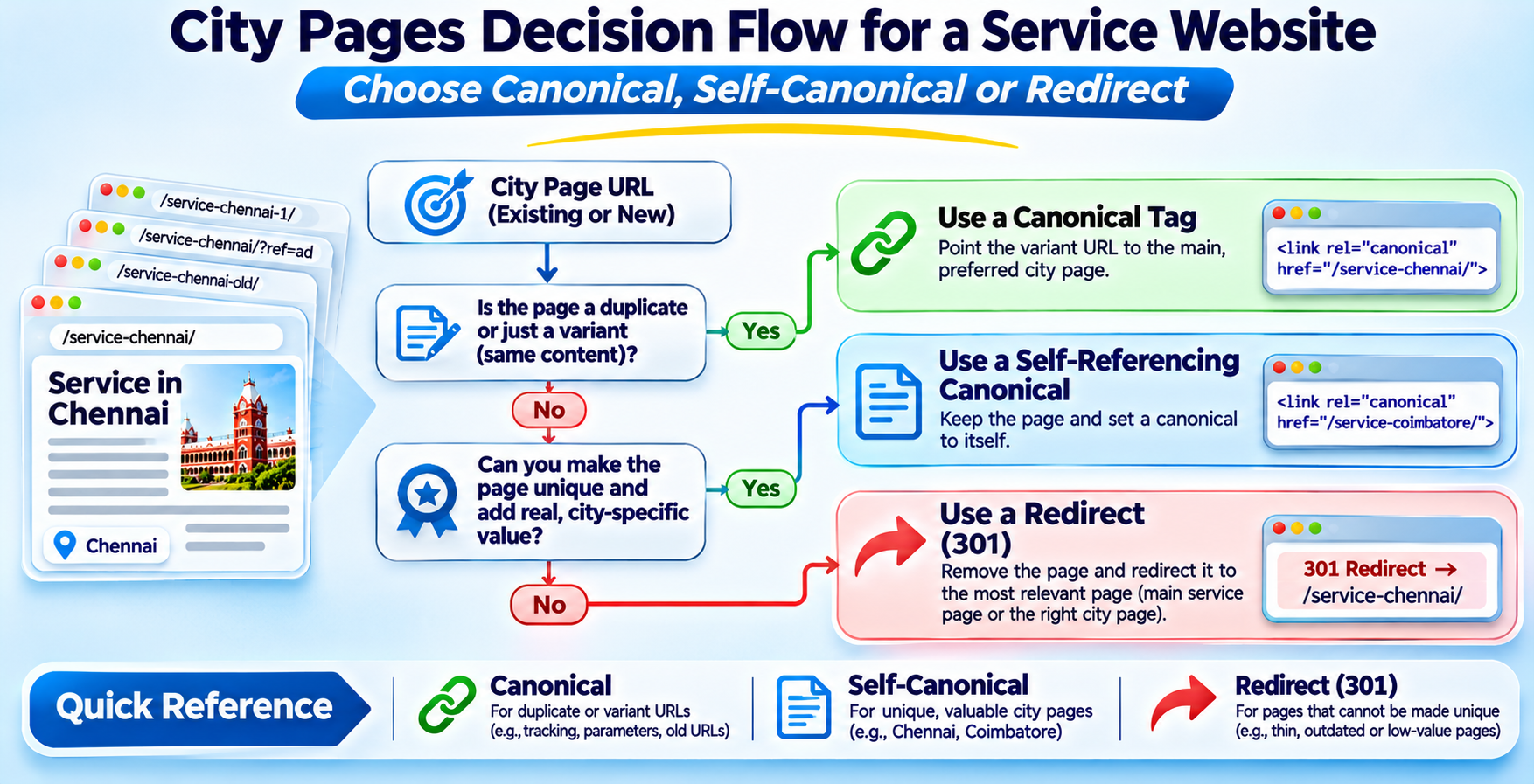
- 301 redirect to the best match. Send the old URL to the closest relevant page, such as the regional page or the main service page, so visitors and any links land somewhere useful.
- Noindex if the page still serves a purpose. A landing page used only for paid campaigns can stay live but be kept out of search results.
- Remove with a 410 or 404 for junk. Pages with no value, no links and no traffic can simply go.
- Clean up after. Update internal links, the menu and the sitemap so nothing points at a redirected or removed URL.
Redirect to a page that genuinely matches the old one. Sending forty city pages to the homepage is treated as a mismatch and wastes the signals you wanted to keep.
Step 5: Set Canonicals the Right Way
A canonical tag tells search engines which URL you prefer when several show the same content. Google describes the rel=canonical annotation as a strong signal, not an order, in its guide to consolidating duplicate URLs, so use it to confirm your choice and not to cover up a weak page.
- Give every indexable page a self-referencing canonical. Each kept city page should point to its own address.
- Use cross-page canonicals only for true duplicates. A parameter version of a page should point to the clean version.
- Do not canonical every city to one page. This tells Google the cities are the same page, which contradicts the unique content you just wrote. Use a redirect if you really want to merge them.
- Keep signals consistent. The canonical, the sitemap, internal links and redirects should all name the same preferred URL.
- Use full URLs. Write the complete address with https, not a relative path, and put one canonical per page.
Canonicals do not fix thin or copied content. They only name a preference. If multi-city duplicate content is the underlying disease, the earlier steps are the treatment and the canonical is the label on the bottle.
Step 6: Fix URL Variants and Technical Duplicates
Some duplication has nothing to do with writing. It comes from the same page being reachable at several addresses.
- One protocol and one host. Redirect http to https and pick either www or non-www, then redirect the other.
- One trailing-slash style and one letter case. Choose a pattern and redirect the alternatives.
- Parameters. Tracking and filter parameters should canonicalise to the clean URL, and internal links should never use them.
- Print, AMP and test copies. Remove or block staging sites and old copies that crawlers can reach.
These fixes are small, mechanical and low risk, which makes them a good first week of work while you decide the harder content questions.
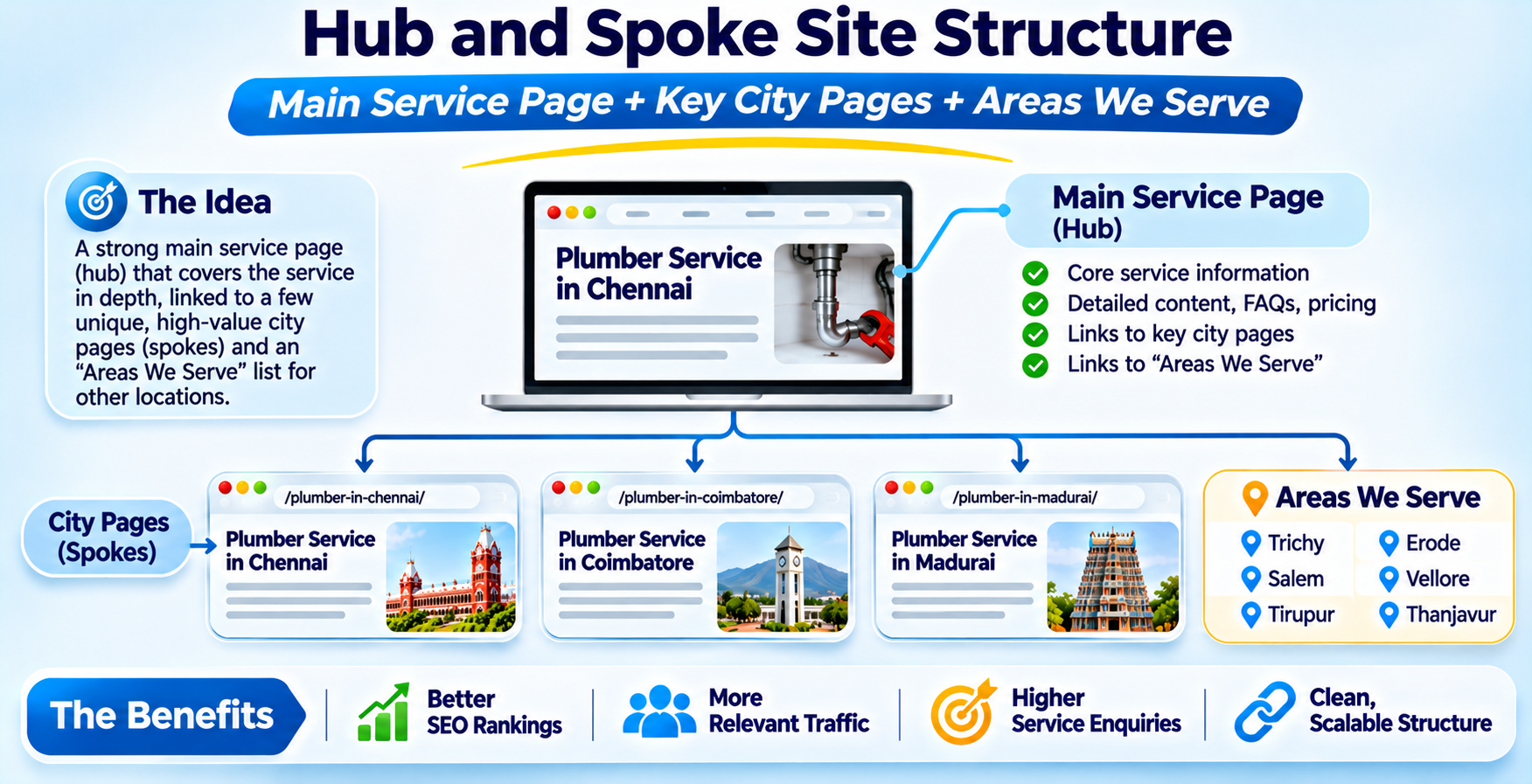
Step 7: Build a Hub-and-Spoke Structure
After the cleanup, give the site a structure that stops the problem from returning. A main service page acts as the hub and explains the service in full. City pages with real substance are the spokes, each linking back to the hub and to a few nearby spokes where it helps a visitor.
- A clear "areas we serve" page listing smaller cities in plain text, without a page for each.
- Breadcrumbs from the home page to the service to the city, so the hierarchy is visible.
- Local business structured data only for locations you really operate, with their own accurate address and phone.
- A simple publishing rule: no new city page goes live without the proof, specifics and contact details in Step 3.
Step 8: Monitor in Search Console
Cleanup is not instant. Google needs to re-crawl and re-evaluate the pages, and that takes weeks. Check three things regularly.
- Page indexing statuses. The count of duplicate statuses should fall, and your kept city pages should show as indexed.
- The URL Inspection tool. For your key city pages, confirm that the user-declared canonical matches the one Google selected.
- Impressions and enquiries by city. Judge success by whether the pages you kept earn clicks and enquiries, not by how many URLs you have.
Expect some movement while Google settles, and resist the urge to keep changing things. Make the fixes, give them time, and review monthly.
A 30-Day Cleanup Plan for Multi-City Duplicate Content
- Week 1: measure and fix the mechanical issues. Build the URL sheet, read the Page indexing report, and fix http, www, slash and parameter duplicates.
- Week 2: decide. Apply the Step 2 test to every city page and mark each as keep, rewrite, merge, noindex or remove.
- Week 3: rewrite and redirect. Rewrite the pages you are keeping with real local material. Put 301 redirects in place for the merged pages and update internal links and the sitemap.
- Week 4: canonicals and structure. Check every canonical, build the hub and areas page, and submit the updated sitemap. Record a baseline for Step 8.
Want us to run the audit and give you a keep, merge and redirect plan for your cities? Send your site address.
WhatsApp +91 88070 03902What a Cleanup Costs: 2026 Market Estimates in Rupees
Costs depend on the number of pages and how much needs rewriting. These are 2026 planning estimates, not a quoted price, and quotes from different firms will vary.
| Work | Typical range (2026) | Note |
|---|---|---|
| Duplicate content audit and plan | ₹15,000 to ₹60,000 | Scales with the number of URLs |
| Technical fixes: redirects, canonicals, sitemap | ₹10,000 to ₹50,000 | Depends on the platform and number of rules |
| Rewriting a city page with real local content | ₹2,500 to ₹8,000 per page | Needs your input: projects, details, photos |
| Monitoring and fixes (monthly) | ₹8,000 to ₹25,000 | Optional, for the first few months |
The cheapest saving is usually to keep fewer pages. Rewriting twelve strong pages costs far less than rewriting forty weak ones, and the result is easier to maintain.
6 Mistakes That Keep the Problem Alive
- Changing only the city name. It does not make a page unique.
- Canonicalising every city to one page. It contradicts your own content.
- Redirecting everything to the homepage. It wastes the value of the old pages.
- Inventing local proof. Fake reviews and addresses are a risk to your reputation.
- Rewriting before measuring. You may rewrite pages that should have been merged.
- Letting the template return. Without a publishing rule, new city pages repeat the old mistake.
Why Work with iStudio Technologies on Multi-City Duplicate Content
We are iStudio Technologies, an SEO, web design and software company in Valasaravakkam, Chennai, with 17+ years behind us, 500+ projects delivered and an in-house team that covers audits, content, development and reporting under one roof. We work with service businesses in Chennai and across India.
For a multi-city site, we start with measurement. We build the URL sheet, read your Search Console data, apply the keep, merge or remove test with you, and then handle the redirects, canonicals and structure. We will tell you plainly if you should have fewer pages, and we do not write fake local content. We do not promise rankings or a recovery date, because no honest agency can, but we do commit to a clear plan, careful changes and before and after reporting.
Frequently Asked Questions
How do I fix duplicate content on a multi-city website?
Does Google penalise duplicate content?
Should every city have its own page?
Can I point all city pages to one canonical?
What is a doorway page?
How long does it take to see results after cleaning up duplicate pages?
Does iStudio Technologies fix multi-city duplicate content?
Related iStudio Technologies Services
More of our work that connects to a clean multi-city site, grouped by what you need next.
Fix and Rank
- SEO company in Chennai, the home for every search project we run.
- Google first-page ranking services in Chennai for organic visibility beyond the map.
Local Presence
- Local SEO services in Chennai for location profiles and local pages.
Build It Right
- Web development company in Chennai for redirects, canonicals and site structure.
- Web design company in Chennai for clear, scalable page templates.
Get a Duplicate Content Audit for Your Site
Send us your website address and the cities you serve. We will tell you which pages to keep, merge or redirect, and put the plan and the cost in writing.
WhatsApp or call +91 88070 03902