
Large Catalog Ecommerce Performance: How to Build a Fast Site for 10,000+ Products
A store with a handful of products stays quick almost by accident. With ten thousand or more, every search, filter, category page and import can slow down, and visitors leave long before the page finishes loading. Here is how to measure the problem, the seven places it usually hides, and what to fix first.
Large Catalog Ecommerce Performance: What Makes 10,000 Products Slow?
A large catalogue is slow when work that should happen once is repeated for every visitor: running heavy database queries for search and filters, building huge category pages, sending oversized images, and running scripts nobody checked. The fix is rarely one big change. It is a short list of specific repairs, in the right order, measured with real visitors' data.
This guide is for owners and managers of online stores with thousands of products, and for the developers who run them. It follows the order we use: measure, fix search and images, add careful caching, tidy scripts and checkout, control filter pages, and keep the catalogue importable without slowing the site.
An honest limit: we give no speed benchmarks, because results depend on your platform, hosting and catalogue. We name the changes that usually matter, and explain how to check that each one helped on your own site.
How Should You Measure Speed Before Fixing It?
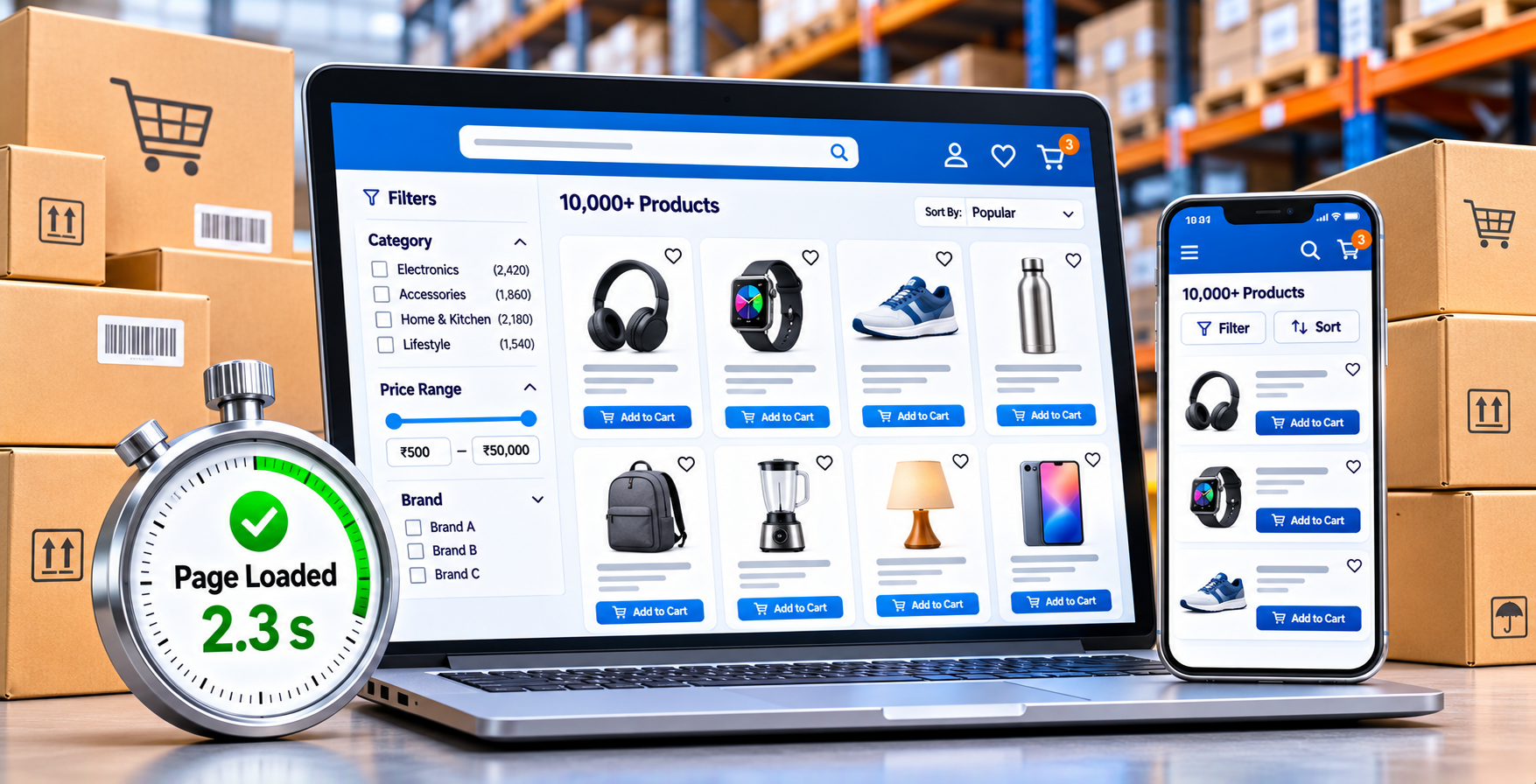
Measure before you change anything in a large catalog ecommerce performance project, or you will not know what helped. Use real visitors' data where you can, because a test on a fast office connection hides the problems that phone users on mobile data see.
Google's web.dev guidance on the Core Web Vitals names three measures. Largest Contentful Paint (LCP) is how quickly the main content appears. Interaction to Next Paint (INP) is how quickly the page responds to a tap or click. Cumulative Layout Shift (CLS) is how much the layout jumps while loading. The commonly cited targets for a good result are an LCP of 2.5 seconds or less, an INP of 200 milliseconds or less and a CLS of 0.1 or less, judged at the 75th percentile of real visits.
On a large catalogue, measure each page type separately, because they fail in different ways. A home page, a category page, a search results page, a product page and the checkout are five different problems.
- Field data. Look at Core Web Vitals data for real visitors in Google Search Console, where it is available for your site.
- Lab tests. Run page tests on a mid-range phone profile, for the slowest templates, to see what blocks loading.
- Server timing. Record how long the server takes to answer each page type, apart from what happens in the browser.
- Business numbers. Note conversion rate and bounce rate by page type, so that you can tell whether speed work pays off.
The Seven Bottlenecks and Their Fixes
These are the seven places we check first in large catalog ecommerce performance work. They are in the order that usually gives the most improvement for the effort, though your measurements may point elsewhere.
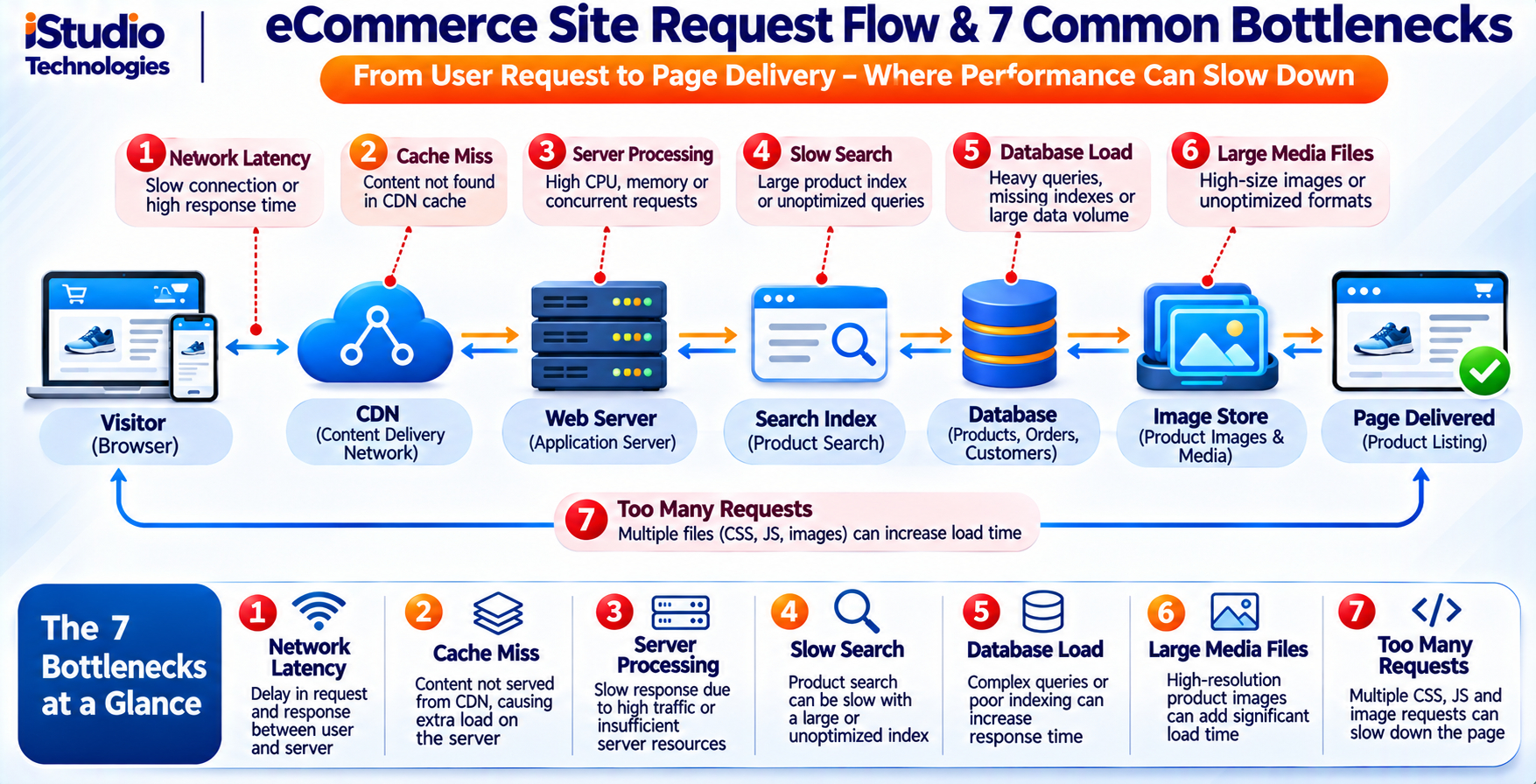
Bottleneck 1: Slow Search and Filtering
Often the biggestAsking a general database to search and filter across thousands of products with several filters at once is slow, and it gets slower as the catalogue grows. Typing a word into the search box should not trigger a full scan of the product table.
Fix: use a dedicated search engine or index for search and filters, such as an open-source engine like OpenSearch or Meilisearch, kept in step with the catalogue. Pre-compute filter counts where you can, and return only the fields a results page needs. Add typo tolerance and synonyms, which also helps buyers find products.
Bottleneck 2: Heavy Category Pages
Page weightA category page that tries to show hundreds of products at once sends too much data and takes long to draw.
Fix: show a sensible number of products per page, use numbered pages or a "load more" button that still has real page links for search engines, and send only the data each product card needs. Keep category and product pages rendered on the server or pre-built, so that the first view does not wait for scripts.
Bottleneck 3: Oversized Images
Biggest bytesProduct photos are usually the heaviest part of a page, and a category page shows dozens of them.
Fix: generate several sizes of every image and serve the one that fits the screen, use modern formats such as WebP or AVIF with a fallback, set width and height so the layout does not jump, lazy-load images below the first screen, and do not lazy-load the main image that sets LCP. Process images automatically at upload, so that staff cannot publish a huge file by mistake.
Bottleneck 4: Uncached Pages and a Slow Server
ServerIf the server rebuilds the same category page for every visitor, it does the same work thousands of times.
Fix: put a content delivery network (CDN) in front of the site, cache pages and images, and add a cache for repeated database results. Add the database indexes that your slowest queries need, and remove repeated queries inside loops, a common cause of slow listing pages. The next section covers how to cache without showing stale prices.
Bottleneck 5: Too Many Scripts
ResponsivenessChat widgets, review tools, tracking tags and sliders each add script weight, and together they make taps and filters feel slow, which hurts INP.
Fix: list every script, remove the ones that no one uses, load the rest after the page is usable, and test the effect of each on a mid-range phone. Replace heavy sliders with simple static banners.
Bottleneck 6: Slow Cart and Checkout
RevenueCart and checkout cannot be cached like a category page, so they depend on fast server code and fast calls to payment, shipping and tax services.
Fix: keep checkout pages light, call outside services in the background where you can, set timeouts so a slow partner does not freeze the page, and test at busy times with a realistic number of visitors.
Bottleneck 7: Heavy Imports and Admin Work
OperationsUpdating thousands of prices and stock levels, or importing a supplier file, can slow the live site if it runs on the same server at the same time.
Fix: run imports as background jobs in small batches, outside busy hours, update only the products that changed, and clear only the affected cached pages afterward. Give the admin panel its own capacity if staff work in it all day.
iStudio Engineering Note: Cache Smartly and Invalidate on Change
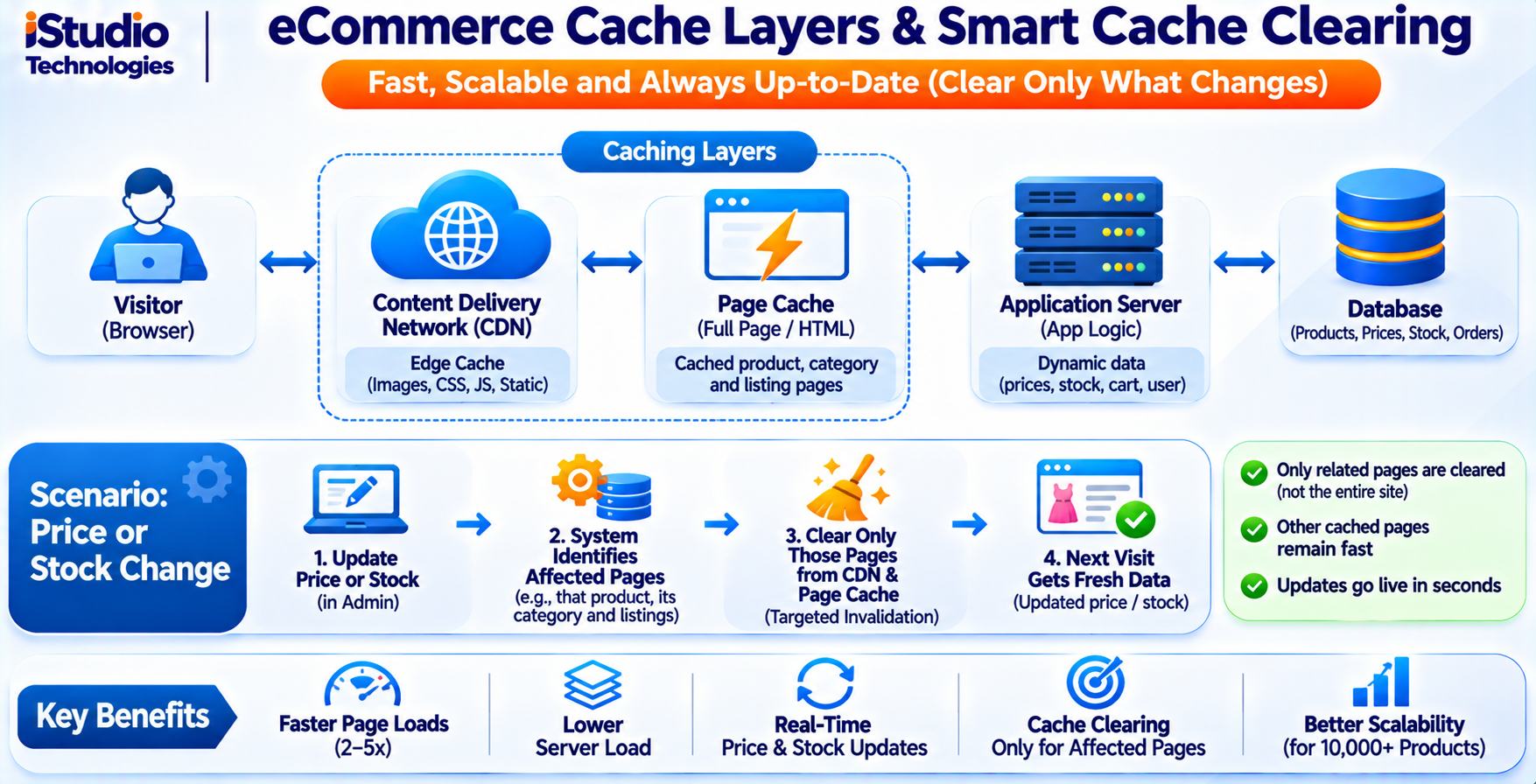
The most common design mistake in large catalog ecommerce performance work is one cache time for everything. A product description can be cached for hours. A price or a stock count cannot. Treating them the same either shows wrong prices or gives up the speed that caching was meant to give.
- Separate stable from changing data. Cache stable parts, such as descriptions, images and category structure, for a long time. Fetch changing parts, such as price and stock, separately and cache them briefly.
- Invalidate on change. When a price or stock level changes, clear only the pages that show that product, and not the whole cache. Keep a record of which pages list which products.
- Serve a slightly old page while a new one builds. Where the platform supports it, show the cached page and refresh it in the background, so that no visitor waits for a rebuild.
- Keep carts and accounts out of shared caches. Pages that differ per visitor must not be stored and shown to others.
- Set a performance budget for each template. Agree limits for page weight, number of images, script size and server time for category, product, search and checkout pages. A change that breaks a limit is fixed before release.
- Watch the cache hit rate and the slowest queries. A falling hit rate or a new slow query is an early warning, long before customers complain.
This takes planning, and it keeps a store fast as products and campaigns multiply. It also stops the embarrassing mix of a cached price that does not match the checkout.
How Do Filters and Crawling Affect a Large Catalogue?
Filters are where large catalog ecommerce performance and search visibility collide. Each combination of colour, size, brand and price can create its own web address, and a big catalogue can produce a huge number of near-identical pages. That slows your server when crawlers visit them, and it can hide your important pages in the noise.
Google's Search Central blog post on faceted navigation describes it as a helpful way for people to find products that can become a serious search problem if not implemented carefully. We suggest you decide, filter by filter, what search engines should see.
- Let a few filters earn their own pages. A filter that matches how people search, such as a brand within a category, may deserve a proper page with its own title and text.
- Keep the rest out of the way. Combinations with no search value should not create endless crawlable links. Use a mix of canonical tags, noindex and blocking rules, and test each change, because a wrong rule can hide good pages.
- Make filters fast without new addresses. Where possible, apply filters with a script that updates the list, while real links remain for the pages you want found.
- Return clear status codes. A product that is gone for good should return a proper not-found or gone response, or redirect to a close match, and not a soft error page.
For duplicate pages across many addresses, see our guide on fixing duplicate content on a multi-city website. If you are moving platforms, read how to recover rankings after a website redesign before you launch.
What Should You Fix First, and Who Should Do It?
To improve large catalog ecommerce performance step by step, start with the change that your own measurements say matters most. This table is our usual order when we have no other information.
| Order | Fix | Why first |
|---|---|---|
| 1 | Measure by page type, with real visitor data | Stops guessing and shows the worst template |
| 2 | Compress and resize images; fix the main image on category and product pages | Largest bytes, quick win, helps LCP |
| 3 | Add a CDN and page caching with clear invalidation rules | Cuts server work for every visitor |
| 4 | Move search and filters to a search index | Biggest change on large catalogues, so plan it carefully |
| 5 | Remove or defer scripts | Improves taps and filters, helps INP |
| 6 | Control filter URLs and crawling | Protects search visibility and server load |
| 7 | Move imports to background jobs; test checkout under load | Protects revenue at busy times |
Fixes 2, 3 and 5 are often possible on any platform. Fix 4 usually needs a developer who has worked with search engines, and fix 6 needs someone who understands both the platform and search. If you want a team to run the audit and make the changes, our web development team in Chennai can start with a measurement report. For store features beyond speed, see jewellery ecommerce website features as an example of a catalogue-heavy build.
Running a store with thousands of products and slow pages? Send us your site address and your biggest complaint, and we will tell you where to look first.
Request a Speed AuditCommon Questions
Why is my store slow with thousands of products?
Do I need to change platforms to speed up a large catalogue?
Is infinite scroll bad for search?
How often should I cache prices and stock?
How do I know the fixes worked?
Find Out What Is Slowing Your Catalogue
Send us your site address and your slowest pages. We will measure each page type and suggest what to fix first.
Request a Speed Audit