
Custom ERP Development Timeline: How Long It Takes to Build One for a Mid-Size Factory
Ask three people how long an ERP will take and you will hear three answers. The honest answer depends on scope, on how clean your data is and on how fast your people decide. Here are our estimates for three scopes, the phases inside them, what usually slows a project and how to shorten it.
Custom ERP Development Timeline: How Long Does a Mid-Size Factory Need?
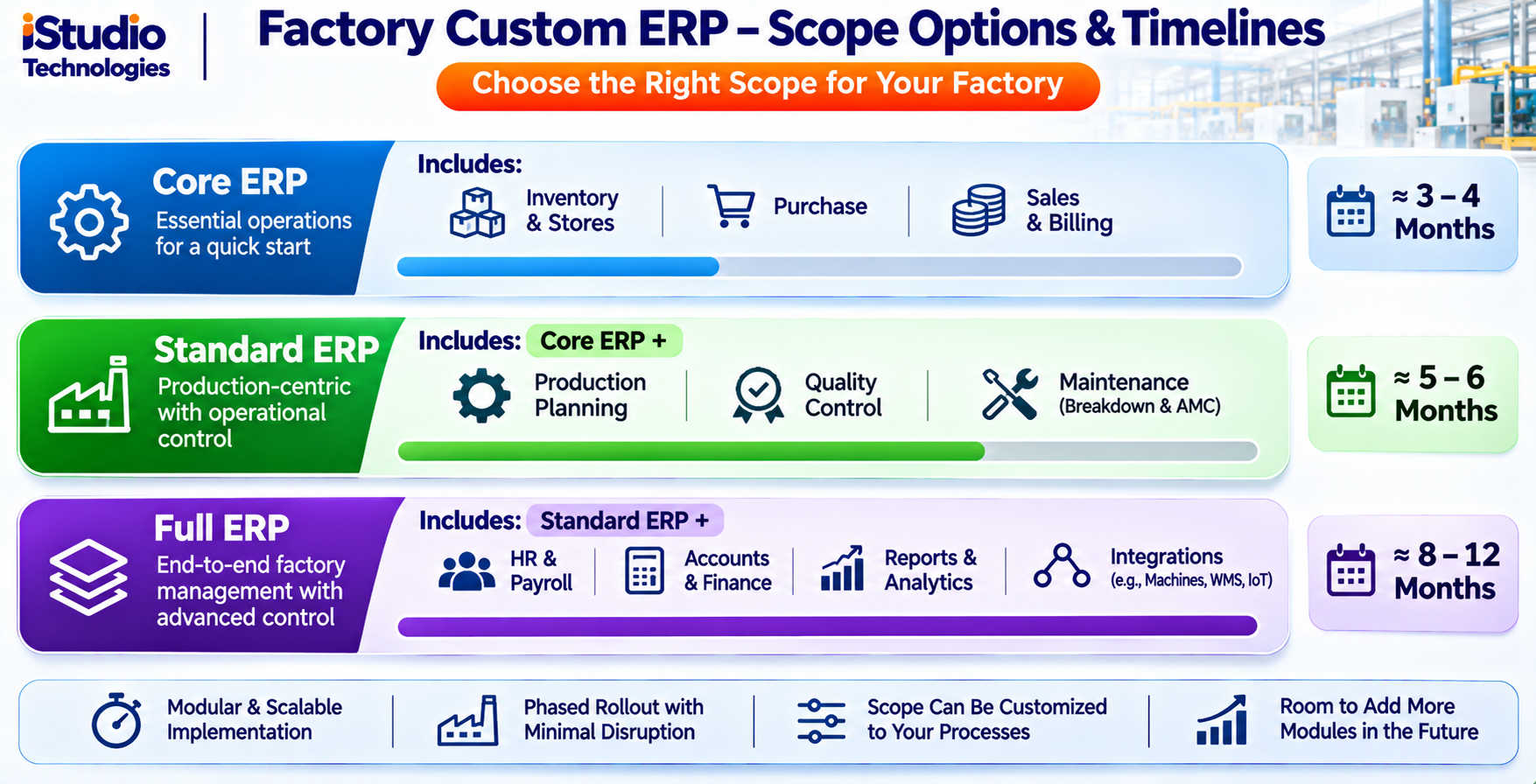
In our estimate, a core ERP for a mid-size factory takes about 6 to 9 months, a standard scope with production planning, quality, maintenance and accounts links takes about 9 to 15 months, and a full scope with shop-floor data capture, several plants and partner portals takes about 15 to 24 months or more. Most of the time goes to understanding the processes, cleaning data and getting people to use the system, and not to writing code.
This guide is for owners, plant heads and finance heads who must plan a budget, a team and a start date. It explains the tiers, the phases inside them, and how to release in waves so that the factory gains value before the whole system is finished.
An honest limit: these are iStudio's own estimates for typical projects, not market data and not a promise. Published guides give very wide ranges, from a few months to well over a year, because they mix packaged and custom projects and businesses of different sizes. Your own timeline depends on the points we list, and a discovery phase is the way to firm it up.
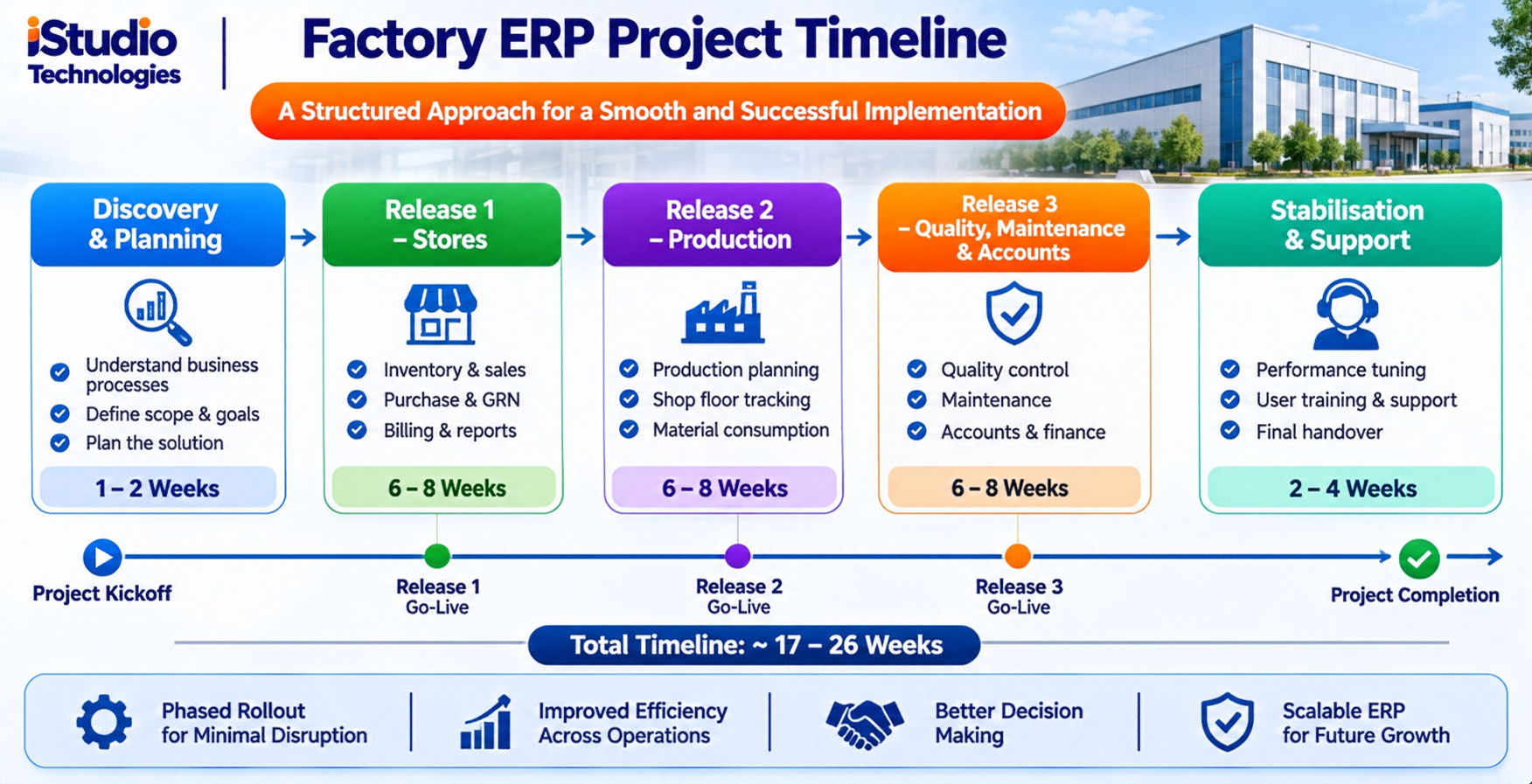
What Do We Mean by a Mid-Size Factory and a Custom ERP?
Before we compare months, we fix two terms, because a custom erp development timeline means little without them.
Mid-size factory. We mean a manufacturer with a few hundred employees, one to three plants, several product lines, its own stores and purchase team, and a finance team that closes the books every month. The government's Udyam portal classifies a medium enterprise as one whose investment does not exceed ₹125 crore and turnover does not exceed ₹500 crore, according to the Udyam registration portal. Many small and some larger factories have similar needs, so use this as a rough guide and not a fixed line.
Custom ERP. A system built or heavily configured around your own processes, covering functions such as inventory, purchase, sales, production, quality, maintenance and accounts links, instead of a packaged product used as it comes. The more your processes differ from the standard, the stronger the case for custom work. Our guide on custom software versus readymade shows how to decide.
If a packaged ERP already fits most of your processes, it will usually be faster to start than a custom build. Choose custom when your pricing, production routes or compliance needs are unusual enough that a packaged product would need heavy workarounds.
Questions to Settle in the First Weeks
Which plants, departments and product lines are in the first release? Which reports do the owners read every week? Which other systems must it exchange data with, such as accounting, payroll, weighbridge or machine software? Who signs off each process, and who owns the data? A factory that can answer these in discovery usually moves faster, because most late surprises start as an unasked question here.
Timeline Tiers: What Each Scope Takes
| Scope | What it includes | Typical timeline (iStudio estimate) |
|---|---|---|
| Core | Item and supplier masters, stores and stock, purchase, sales and dispatch, basic production orders, reports, links to your accounting software | About 6 to 9 months |
| Standard | Core plus bills of material, work orders and costing, quality checks, maintenance schedules, GST and e-invoicing links, role-based dashboards, mobile screens for stores and supervisors | About 9 to 15 months |
| Full | Standard plus shop-floor data capture from machines or scanners, several plants, production planning and scheduling rules, supplier and dealer portals, deeper analytics | About 15 to 24 months or more |
iStudio estimates for a mid-size factory, measured from the start of discovery to the end of stabilisation of the last wave. Not market data and not a quote. This is how we see the custom erp development timeline for a typical factory.
How to Choose a Scope
Choose Core if the factory runs on paper and spreadsheets, and the first goal is one true record of stock, purchases and sales. Choose Standard if production costing, quality and maintenance are where money leaks. Choose Full only once Core or Standard is working and the plant is ready for machine data and multi-plant control. Many factories do well to start with Core or Standard and add the rest in later waves.
Which Phases Make Up the Timeline?
The phases below are those of a Standard scope. They overlap on a real project, so the total is shorter than the sum of the parts. The ranges are iStudio estimates.
| Phase | What happens | Typical length |
|---|---|---|
| 1. Discovery | Walk the processes with each department, list modules, integrations, reports and rules, agree what is in and out of the first release | 6 to 8 weeks |
| 2. Design | Screens, data model, user roles, approval flows and the release plan by wave | 4 to 6 weeks |
| 3. Build | Develop each wave in short cycles, showing working screens to users every few weeks | 20 to 32 weeks across the waves |
| 4. Data migration | Clean and load items, bills of material, suppliers, customers, opening stock and balances; run trial loads | 6 to 10 weeks, overlapping the build |
| 5. Testing | Test each process end to end with real examples, fix defects, repeat | 6 to 8 weeks, spread across the waves |
| 6. Training | Train super-users first, then each department, using the live screens | 4 to 6 weeks, before each wave |
| 7. Go-live and parallel run | Switch a wave on, run the old and new methods side by side for a short period, then retire the old | 4 to 8 weeks for each wave |
| 8. Stabilisation | Fix issues, tune reports, support users and hand over to the factory's own team | 6 to 10 weeks after the last wave |
iStudio estimates for a Standard scope. Phases overlap, so they do not add up to the total. The custom erp development timeline for your factory should be confirmed after discovery.
iStudio Engineering Note: Release in Waves, Not in One Big Bang
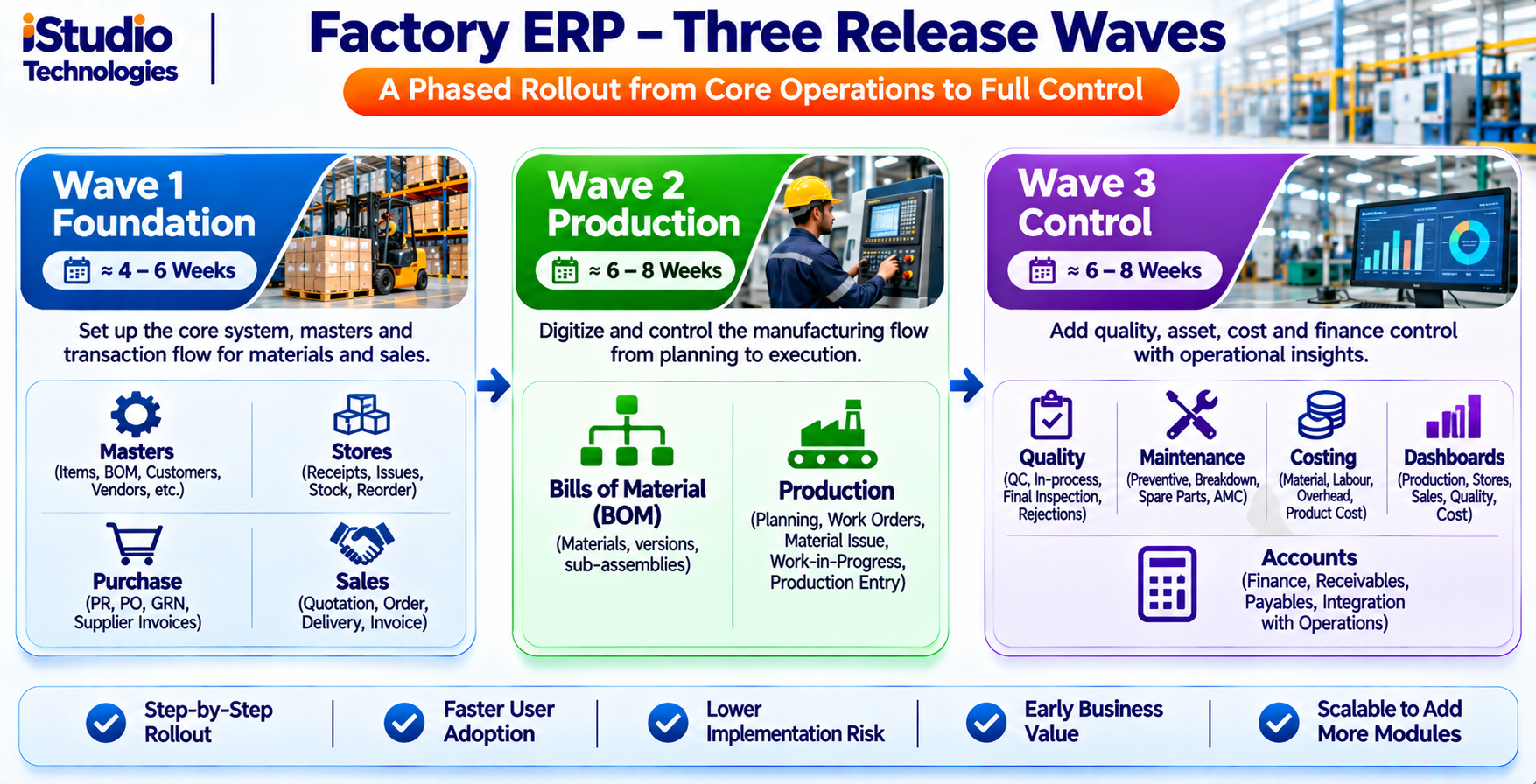
The riskiest way to run a custom erp development timeline is to build everything and switch on the whole system on one day. If one process fails, the whole factory feels it. A safer plan releases modules in waves, each one useful on its own.
- Wave 1: the foundation. Item and supplier masters, stores and stock, purchase and sales. These feed everything else, and a single true stock record gives the factory value early.
- Wave 2: production. Bills of material, work orders, material issue and production reporting, linked to Wave 1 stock.
- Wave 3: control. Quality checks, maintenance, costing, dashboards and the links to GST and your accounting software.
- Keep one master for each fact. Each item, supplier and rate lives in one place. If two systems both hold stock, errors multiply, so retire the old record as each wave goes live.
- Record stock as events. Receipts, issues, production and adjustments are logged as events with a reason, and balances are derived, as in our guide to the retail POS inventory tech stack. This makes stock differences traceable.
- Rehearse the cutover. Before each go-live, load a copy of real data, run a full day of transactions, check the opening balances against a physical count and agree a rollback plan.
- Control change. Keep a decision log and a change list. A new request is added to a later wave unless it blocks the current one, and the plan shows its effect on months.
Waves also help adoption. Users learn one area at a time, and the factory sees real results at the end of each wave, not only at the end of the project.
What Slows a Custom ERP Down, and How Can You Shorten It?
Most delays come from the factory side as much as from the software side. Know these before you set a date for the custom erp development timeline.
- Unclear processes. If each shift does a task differently, the system cannot copy it. Agree one way first, and write it down.
- Dirty data. Duplicate items, wrong units, missing bills of material and unreliable opening stock are the most common reasons for a late go-live.
- Slow decisions. Open questions stack up when nobody has the authority to settle them. Name one decision-maker for each department.
- Scope growth. Each new idea adds weeks. Keep a change list and review it every sprint.
- Integrations. Links to accounting software, GST systems, machines or partners depend on the other side's readiness.
- Users who are too busy to test. If supervisors cannot spare time, defects surface after go-live instead.
Ways to Shorten the Timeline
- Start cleaning item, supplier and bill-of-material data during discovery.
- Appoint a super-user in each department with protected time every week.
- Use standard patterns where your process is standard, and spend custom effort only where it earns its keep.
- Fix the scope of Wave 1 early, and move late requests to later waves.
- Ask for working screens every few weeks, and give feedback within days.
Rules and Data to Plan For
This is general guidance and not legal or tax advice. The ERP will handle GST invoices and sometimes e-way bills and e-invoicing, and the duties that apply depend on your turnover and rules that change, so ask your accountant and plan the links early. It will also hold personal data of employees, suppliers and customers. India's Digital Personal Data Protection Rules were notified in November 2025, according to a Press Information Bureau release, and are being phased in, so limit who can see payroll and personal records and keep an audit trail.
If you want a team to run discovery and give you a firm plan, our software development team in Chennai can map your processes to a scope, waves and a timeline. For budgeting a similar build in another sector, see custom school ERP cost.
Planning an ERP for your factory? Share your plants, departments and current systems, and we will estimate the scope, the waves and the timeline.
Plan Your Factory ERPCommon Questions
What is the minimum time to build a custom ERP for a factory?
Can we start using the ERP before it is fully built?
Why do ERP projects run late?
Is a packaged ERP faster than a custom one?
What should we prepare before the project starts?
Get a Firm Plan for Your Factory ERP
Share your plants, departments and current systems. We will propose a scope, release waves and a timeline you can plan around.
Plan Your Factory ERP