
How to Make a Chennai Hospital Website Load Under 2 Seconds
A practical 6-step plan to speed up a hospital website on mobile: images, scripts, hosting, forms and layout shift, with the targets Google actually measures.
- The short answer
- What under 2 seconds means
- Step 1: The hero image
- Step 2: Third-party scripts
- Step 3: Hosting and caching
- Step 4: Theme, plugins, fonts
- Step 5: Doctor pages and forms
- Step 6: Layout shift
- Hospital-specific cautions
- The 30-day plan
- What it costs
- Five mistakes
- Working with iStudio
- FAQs
The Short Answer on Hospital Website Speed Optimization in Chennai
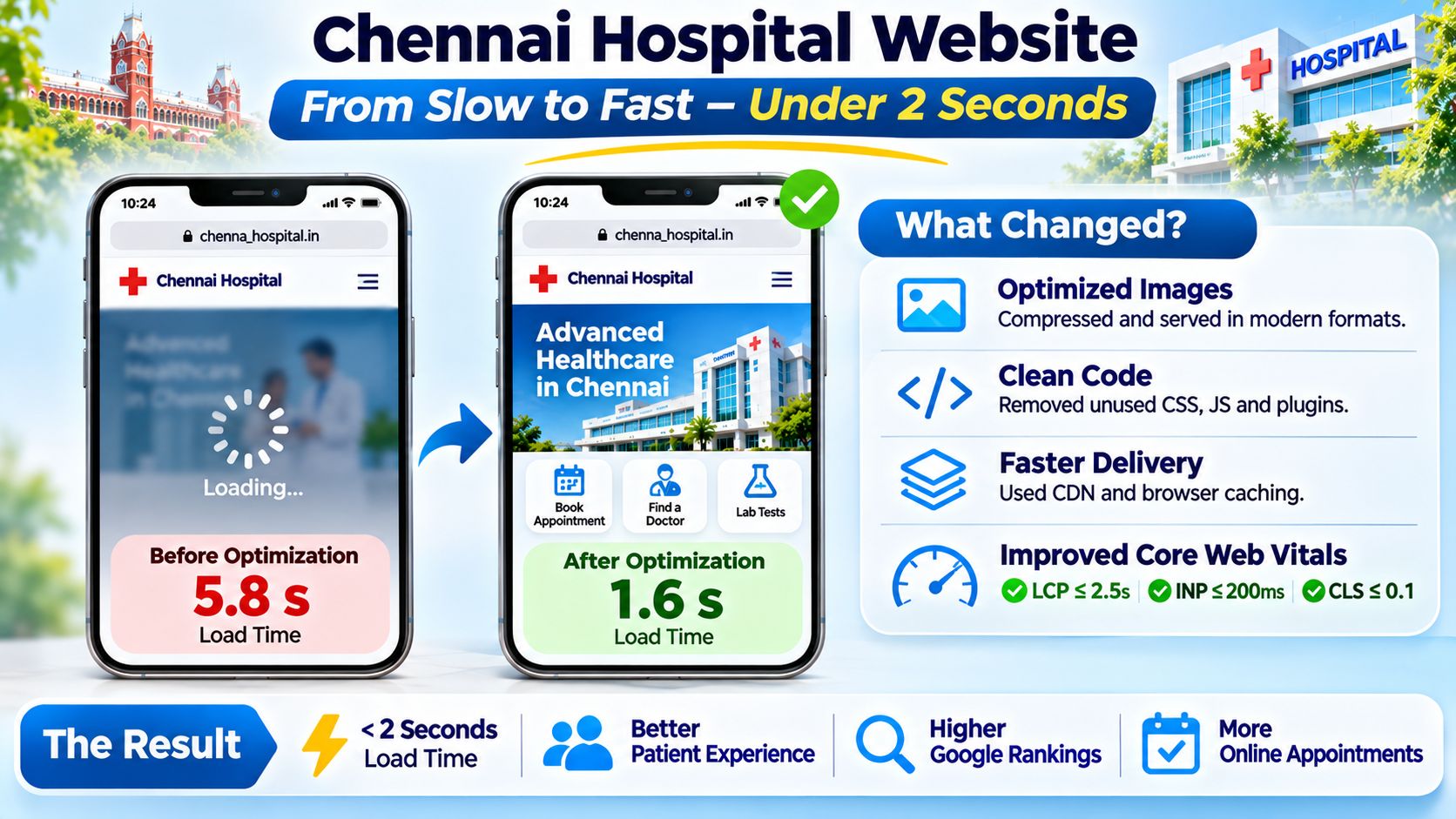
You can get a Chennai hospital website loading in about two seconds on a mobile connection by fixing six things in order: the hero image, third-party scripts, hosting and caching, the theme and plugins, doctor pages and forms, and layout shift. Most slow hospital sites lose their time in the same few places, and none of them need a full rebuild to fix.
Two seconds is our practical target, and it is stricter than Google's. Google treats a page as having a good loading experience when its largest content element appears within 2.5 seconds for at least 75 percent of visits, as set out on web.dev. We aim lower because of who is on the other end. A person searching for a hospital is often worried, in a hurry, and holding a mid-range phone on a patchy connection. They will not wait.
Speed is one factor among many for search and for patient trust. It will not guarantee a ranking, and a fast site with weak content still loses to a slower site that answers the question better. But a slow site wastes every other investment you make in it, from doctor profiles to the booking form.
Want a speed audit of your hospital site? Message our team on WhatsApp or call +91 88070 03902 with your website address, and we will tell you honestly where the time is going.
What Under 2 Seconds Really Means and How to Measure It
"Fast" is meaningless until you measure it. Before any speed work begins, record a baseline, so you can show that each change helped and catch any that did not.
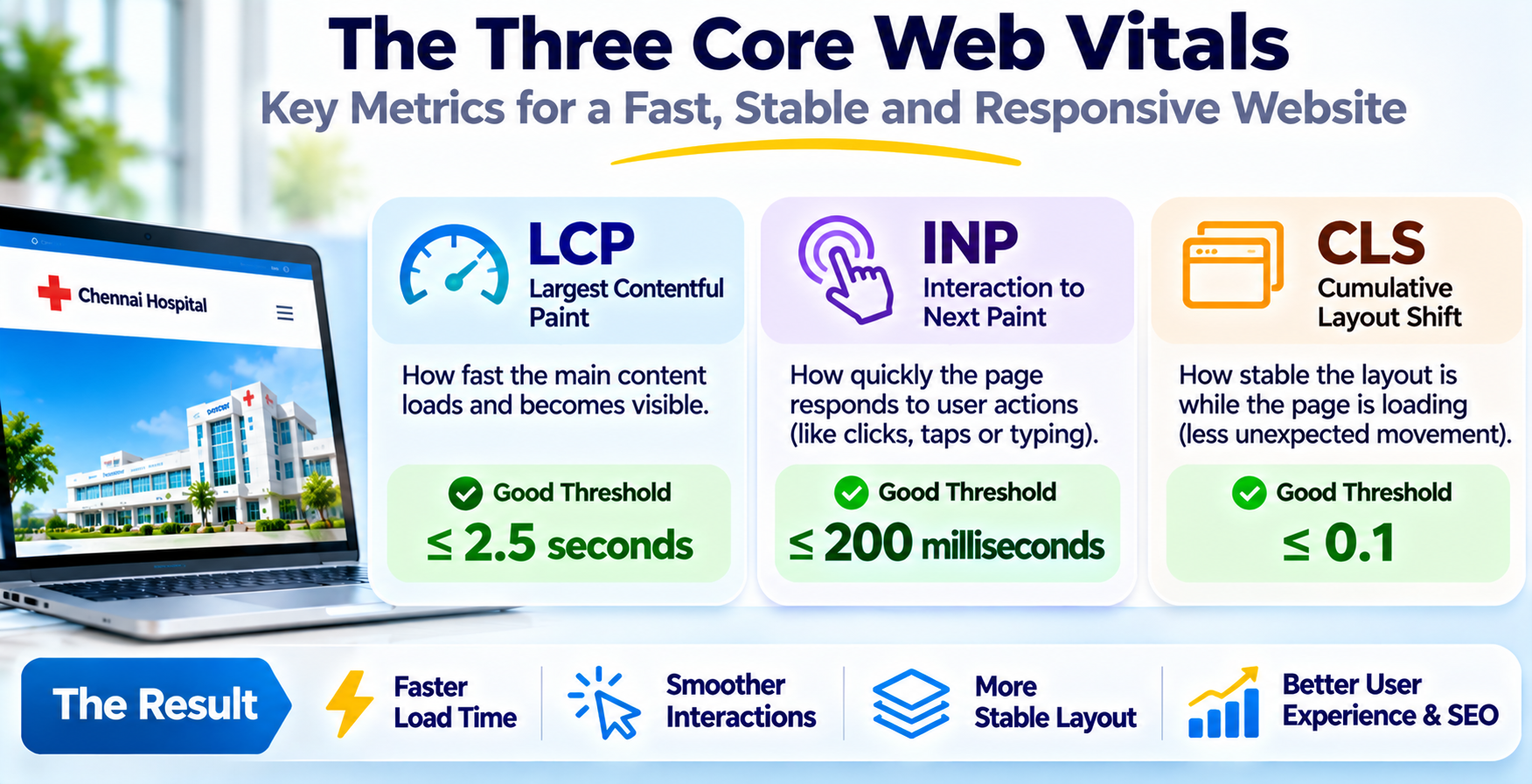
Google judges loading, responsiveness and visual stability with three Core Web Vitals, each assessed at the 75th percentile of real visits. The good thresholds are published on web.dev.
| Metric | What it measures | Good threshold |
|---|---|---|
| Largest Contentful Paint (LCP) | How soon the biggest visible element, usually the hero image or headline, appears | 2.5 seconds or less |
| Interaction to Next Paint (INP) | How quickly the page responds when someone taps or types | 200 milliseconds or less |
| Cumulative Layout Shift (CLS) | How much the page jumps around while it loads | 0.1 or less |
Lab Data and Field Data
Lab tools such as Lighthouse run a simulated test on one device and are good for finding problems. Field data is what real visitors experienced, and it is what Google uses. Check the Core Web Vitals report in Google Search Console for field data on your own site, and use PageSpeed Insights for both views.
Test the Way Patients Browse
Test on a mid-range Android phone, throttled to a 4G connection, not on the office laptop. Test four page types separately: the homepage, a department page, a doctor profile and the appointment page. The homepage is often the best-optimised and the booking page the worst, which is backwards.
Step 1: Fix the Hero Image First
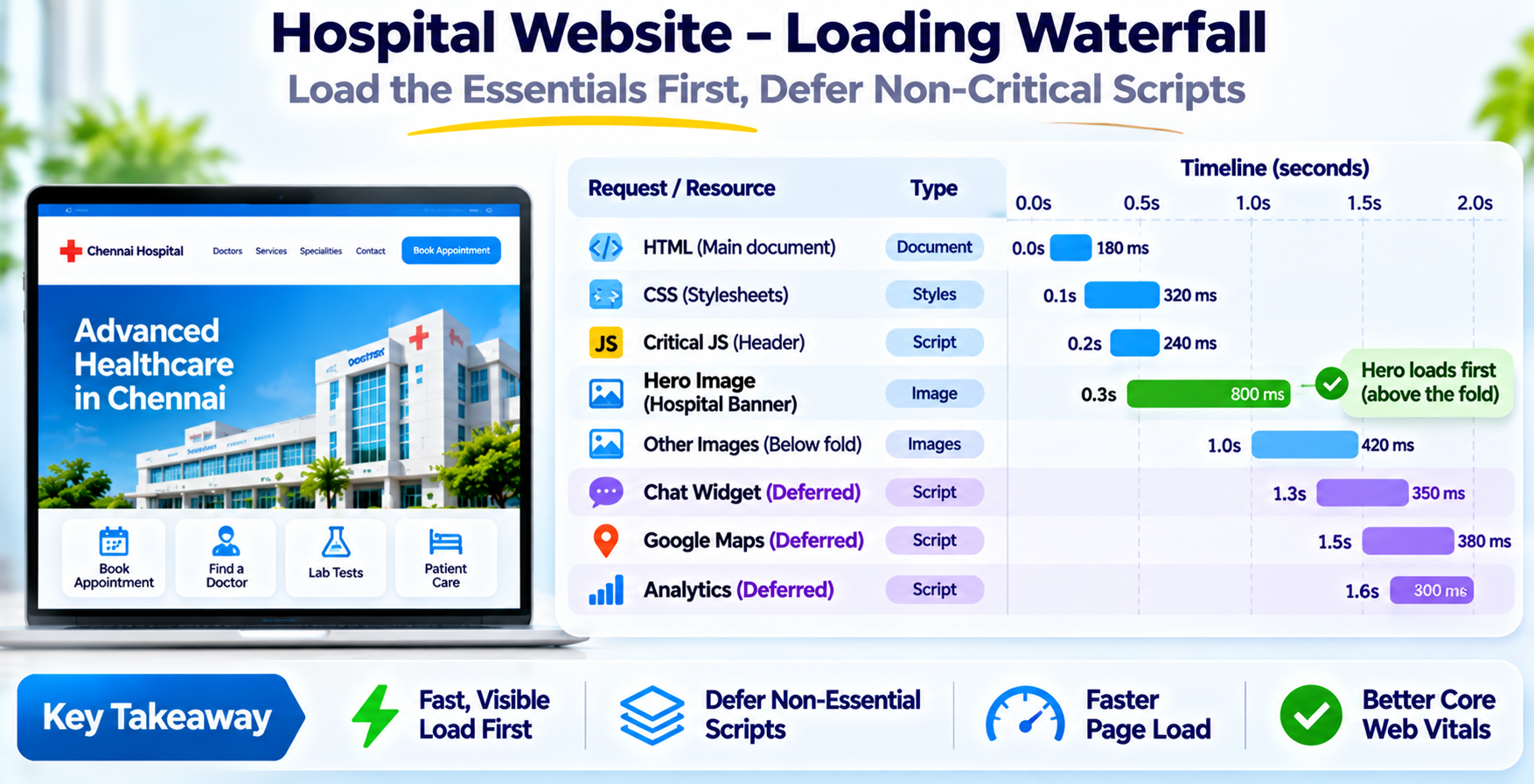
On most hospital homepages the largest element is the big banner at the top, so it decides your LCP. In any hospital website speed optimization plan, fix it before anything else. Google's guide on optimizing Largest Contentful Paint explains why.
- Compress and convert. Export in WebP or AVIF at the quality that still looks sharp. A banner saved straight from a design file is often several megabytes.
- Serve the right size. A phone does not need a 2,500-pixel-wide image. Use responsive sizes so each device downloads only what it will show.
- Do not lazy-load it. Lazy loading helps images further down the page. Chrome's own guidance on image priority says never to lazy-load the LCP image, and many themes and plugins apply it to every image by default.
- Prioritise it. Mark the hero image as high priority so the browser fetches it first.
- Replace the slider. A rotating carousel of five banners downloads all five. One strong static banner loads faster and usually communicates just as well.
Step 2: Cut Third-Party Scripts and Widgets
Hospital sites collect widgets over the years: a chat box, a WhatsApp bubble, analytics, advertising pixels, a tag manager, a review feed, an embedded video, a map. Each one adds requests and work for the phone's processor, and together they slow loading and make taps feel sluggish. Removing what nobody uses is usually the cheapest gain in hospital website speed optimization.
Audit every script. Ask who looks at the data it produces, and if the answer is nobody, remove it. For the ones you keep, load them after the page is usable, or only when a visitor interacts. Show a static map image with a tap to load the live map. Replace a heavy chat widget with a simple WhatsApp link, which does the same job for patients at almost no cost to speed.
Keep the tools that earn their place, such as appointment booking and analytics you genuinely review. The goal is not an empty page. It is a page where every script has a reason to be there.
Step 3: Pick Hosting and Caching That Suit Chennai Visitors
A fast page still starts slowly if the server is slow to answer. This is called time to first byte, and it depends on your hosting, how far the server is from your visitors, and whether pages are cached.
- Host close to your patients. A server in India answers faster for Chennai visitors than one on another continent. Ask your host where your site actually runs.
- Use page caching. Serving a saved copy of a page is far quicker than rebuilding it from the database on every visit.
- Add a content delivery network for images. It stores copies of your images near visitors and takes load off your server.
- Enable compression and caching headers. Text files should be compressed, and files that rarely change should be cached in the visitor's browser.
- Avoid the cheapest shared plan. A hospital site with doctor listings and a booking form deserves better than a plan shared with hundreds of other sites.
If the site stores patient enquiries or appointment details, also confirm where that data is held and how it is protected. Speed and privacy are decided in the same hosting conversation.
Step 4: Clean Up the Theme, Plugins and Fonts
Many hospital sites run on a multipurpose theme with a page builder, a long plugin list, and fonts pulled from several families. Each layer adds code that every visitor downloads, whether or not the page uses it. Treat this as housekeeping for hospital website speed optimization, and do it carefully, because changes here can break layouts.
- Remove unused plugins. Deactivate and delete what you do not use. Replace several small plugins with one that does the job well.
- Trim the page builder's output. Heavy builders wrap simple content in layers of markup. Rebuild the busiest pages with leaner blocks.
- Limit fonts. One or two families and a few weights are plenty. Load them so that text shows straight away instead of waiting.
- Minify and defer. Compress CSS and JavaScript, and stop scripts from blocking the first paint. Test after each change.
- Keep the platform current. Update the CMS, theme and plugins, and ask your host about a current PHP version, with a backup taken first.
Step 5: Keep Doctor Pages and Appointment Forms Fast
These are the pages where patients act, so they deserve extra care. Doctor listings are image-heavy, and appointment forms are script-heavy, which is a bad pairing on a phone.
Doctor Listing and Profile Pages
A page listing sixty doctors with sixty full-size photos is a common culprit. Use properly sized thumbnails, load them as the visitor scrolls, and paginate or filter by department. Keep each profile lean: photo, qualifications, registration details, specialities, timings, and a clear booking button.
The Appointment Form
The form should respond almost instantly when a patient taps a field or submits. Google's good threshold for Interaction to Next Paint is 200 milliseconds, a figure published on web.dev. Heavy form libraries, large validation scripts and chained third-party calls push you past it. Use a lightweight form, validate simply, confirm with a visible message at once, and ask only for what you need to book the slot.
Make the booking page your fastest page, not your slowest. It is the one that turns a visit into care and into revenue.
Step 6: Stop Layout Shift
You have seen it: you go to tap a button, the page jumps, and you tap something else. Cumulative Layout Shift measures that, and a good score is 0.1 or less. On a hospital site, a jump is more than annoying, since it can send a worried patient to the wrong button.
- Set image dimensions. Give every image a width and height so the browser reserves its space before it loads.
- Reserve space for banners. A cookie notice, an emergency announcement or a chat bubble that appears late should sit in space already set aside for it.
- Handle fonts carefully. A late-loading font can reflow the text. Choose a fallback font of similar size to limit the jump.
- Contain embeds. Videos, maps and review feeds should have a fixed-size box from the start.
Hospital-Specific Cautions: Speed Without Cutting Trust or Safety
It is tempting to strip a page bare to win a speed score. Do not. A hospital website has jobs a brochure site does not, and some of those must survive every optimisation.
- Keep the emergency and ambulance numbers prominent. Make them plain text near the top of the page, so they appear even if a script fails.
- Do not remove accessibility. Keep image descriptions, readable contrast, large tap targets and keyboard navigation. Patients include older people and people with disabilities.
- Keep consent and privacy notices. Defer tracking scripts until consent where needed, rather than dropping the notice.
- Keep trust signals. Doctor registration details, accreditations and clear contact information build confidence and should stay visible and fast.
- Be careful with patient data. Do not pass names, phone numbers or health details to third-party tracking tools.
India's data protection framework is still being phased in, and rules on health data are evolving, so verify your obligations with a qualified adviser. This guide is not legal advice. Good hospital website speed optimization makes the site faster without weakening any of the above.
A 30-Day Speed Plan for a Hospital Website
Here is a sequence that puts the biggest wins first. It assumes an existing website you are improving, not rebuilding.
- Week 1: baseline and hero. Record field and lab results for the four page types. Fix the hero image on the homepage and key department pages.
- Week 2: scripts and hosting. Audit and remove or defer third-party scripts. Confirm server location, switch on page caching, and add an image network if needed.
- Week 3: theme, doctors and forms. Remove unused plugins, trim fonts, slim the doctor listing, and lighten the appointment form.
- Week 4: layout shift and retest. Fix jumps, then re-measure against the baseline. Note what moved, and set up monthly monitoring in Search Console.
A speed plan only works if you keep testing. New banners, widgets and plugins creep back in, so check after every significant change. Field data takes weeks to update, so judge the trend, not a single day.
Want a measured 30-day speed plan for your hospital website? Send us the address.
WhatsApp +91 88070 03902What Speed Work Costs: 2026 Market Estimates
Costs depend on the size of the site, the platform and how much has piled up. These are 2026 planning estimates in rupees for hospital website speed optimization, not a quoted price, and quotes from different firms will vary.
| Scope | Typical one-time cost (2026) | What it usually covers |
|---|---|---|
| Speed audit and targeted fixes | ₹15,000 to ₹60,000 | Measurement, image fixes, script cleanup, caching set-up on an existing site |
| Theme and plugin overhaul | ₹60,000 to ₹2 lakh | Rebuilding the heaviest pages leaner, doctor listing and form rework |
| New fast hospital website | ₹1.5 lakh to ₹6 lakh and up | A fresh design and build with performance planned in from the start |
Add yearly hosting, an image network and maintenance, commonly a modest amount compared with the build. Confirm current hosting and network prices with your providers. A fixed scope in writing will always beat a vague hourly estimate.
5 Mistakes That Keep Hospital Sites Slow
- Testing only on the office laptop. Patients use phones on mobile data.
- Uploading photos straight from the camera. Multi-megabyte images are the most common cause.
- Adding a widget for every request. Each one stays on every page.
- Chasing a score, not the patient. A perfect number on a page that lost its emergency contact is a failure.
- Fixing once and never checking again. Speed drifts back as content grows.
Why Work with iStudio Technologies on Hospital Websites
We are iStudio Technologies, a web design and development company in Valasaravakkam, Chennai, with 17+ years behind us, 500+ projects delivered and an in-house team that handles design, development, testing and support under one roof. We build on WordPress and other platforms, and we work with healthcare and service businesses in Chennai and across India.
When a hospital asks us to speed up its site, we start with measurement, not guesses. We test the four page types on a real phone, find where the time goes, and fix the biggest causes first while protecting the emergency contacts, accessibility and consent features a hospital needs. We will tell you plainly when a patched site is good enough and when a rebuild would serve you better. We do not promise rankings or a particular score, but we do report the before and after.
Frequently Asked Questions
How do I make a Chennai hospital website load in under 2 seconds?
What is a good page load time for a hospital website?
What are the Core Web Vitals thresholds?
Does website speed affect Google ranking for hospitals?
Should I lazy load the hero image?
How much does it cost to speed up a hospital website?
Does iStudio Technologies do speed optimization for Chennai hospitals?
Related iStudio Technologies Services
More of our work that connects to a fast hospital website, grouped by what you need next.
Design and Build
- Web design company in Chennai for fast, accessible hospital sites.
- Web development company in Chennai for the platform, booking forms and integrations.
Healthcare Focus
- Healthcare software development in Chennai for hospital systems behind the website.
Get Found
- SEO company for hospitals in Chennai to turn a fast site into patient enquiries.
Get a Speed Audit for Your Hospital Website
Send us your website address. We will measure it on a real phone, tell you where the time is going, and put a fixed-scope plan in writing.
WhatsApp or call +91 88070 03902