
Flutter vs React Native for an Offline-First Field Service App
A practical comparison of storage, sync, background work, device access and team fit, so you can choose a framework for technicians who work where the network does not.
Flutter vs React Native Offline App: The Short Answer
Both frameworks can build a reliable offline-first field service app, so the framework rarely decides whether the project succeeds. What decides it is your sync design, your local database and how well you test on real phones with poor networks. As a rule of thumb, choose Flutter when you want one tightly controlled interface across devices and your team is open to learning Dart. Choose React Native when your team already works in JavaScript or TypeScript and wants to share logic with a web app.
This guide is for the person who has to make that call: a CTO, an operations head or a product owner at a business whose technicians, installers, inspectors or delivery staff work in basements, warehouses, plants, villages and lifts. We build mobile apps in both frameworks, so we have no reason to push one over the other.
It is a practical comparison and not a benchmark. We do not quote speed numbers, because they depend on your app, your devices and your team. Where we name libraries, treat the names as starting points and check each one's maintenance status before you commit, because the mobile ecosystem changes quickly.
Choosing a framework for a field app? Message our team on WhatsApp or call +91 88070 03902 with your user count, devices and the jobs your technicians do offline, and we will give you an honest recommendation.
What Offline-First Really Means for Field Service
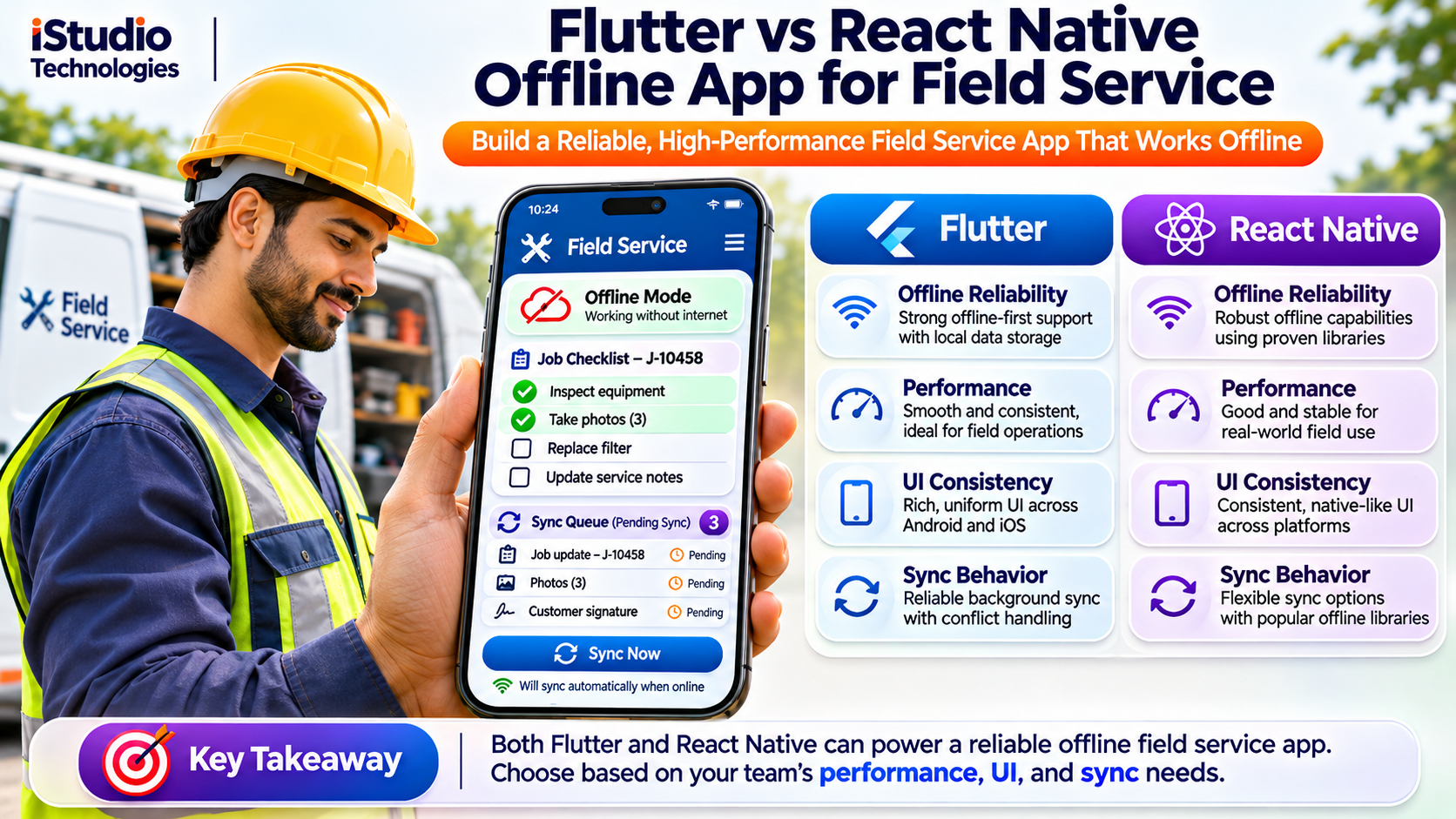
A fair flutter vs react native offline app comparison starts with a clear definition. Flutter's own architecture guidance describes an offline-first application as one that offers most or all of its functionality while disconnected from the internet, relying on stored data in the meantime. The same idea applies whichever framework you pick.
That is different from an app that merely survives a dropped connection. An offline-tolerant app shows an error when the network goes; an offline-first app never needs the network to finish the task in front of the user. For field service, that distinction is the whole product.
The Jobs the App Must Finish Without a Network
- Open today's assigned jobs, with customer details, address, notes and service history already on the phone.
- Fill checklists and inspection forms, including conditional questions and required fields.
- Capture photos, customer signatures and barcode or serial numbers.
- Record parts used, time spent and the final status of the job.
- Check in and out with GPS, and create a follow-up job on the spot.
- Print or share a job report, and sync everything as soon as a connection appears.
Write this list down for your own business before you compare frameworks, because each item becomes a requirement for the database, the sync queue and the device layer.
Local Storage You Can Trust on a Phone
In any flutter vs react native offline app decision, the local database matters more than the user interface toolkit. The phone's database becomes the source of truth while offline, so choose it for reliability, migration support and encryption, not for popularity.
| Need | Typical Flutter options | Typical React Native options |
|---|---|---|
| Structured job data | SQLite through packages such as Drift or sqflite | SQLite wrappers, or WatermelonDB built on SQLite |
| Small settings and flags | shared_preferences | MMKV or AsyncStorage |
| Tokens and secrets | flutter_secure_storage | Keychain and Keystore wrappers |
| Photos and documents | App file storage with path_provider | File system libraries |
These are common starting points, not endorsements. Library maintenance changes, so check recent releases, open issues and platform support before you build on any of them.
A Caution About Realm
If you have seen Realm recommended for mobile sync, note that MongoDB deprecated its Atlas Device SDKs in September 2024 and ended Atlas Device Sync and those SDKs on 30 September 2025. We would not start a new project on that sync service. Whichever database you pick, keep your sync logic on your own server so a vendor decision cannot strand your app.
Storage Rules That Prevent Pain Later
- Plan schema migrations from day one. Technicians update apps at different times, and a bad migration can lock them out of unsynced work.
- Encrypt data at rest. Customer names, addresses and photos live on the phone. Use database encryption such as SQLCipher for sensitive data.
- Keep large files out of the database. Store photos as files and keep only their paths and upload status in the database.
- Limit what is downloaded. Send each technician only their jobs and their region's reference data, so the phone does not fill up.
- Plan for a lost phone. Support remote sign-out and wiping of app data. Personal data rules in India are being phased in, so confirm your obligations with an adviser.
Sync Design: The Part That Decides Success
Neither framework gives you sync for free, and that is the honest centre of the flutter vs react native offline app question. Most failed offline projects fail on sync rules, not on the framework. The pattern below works in both.
The Outbox Pattern
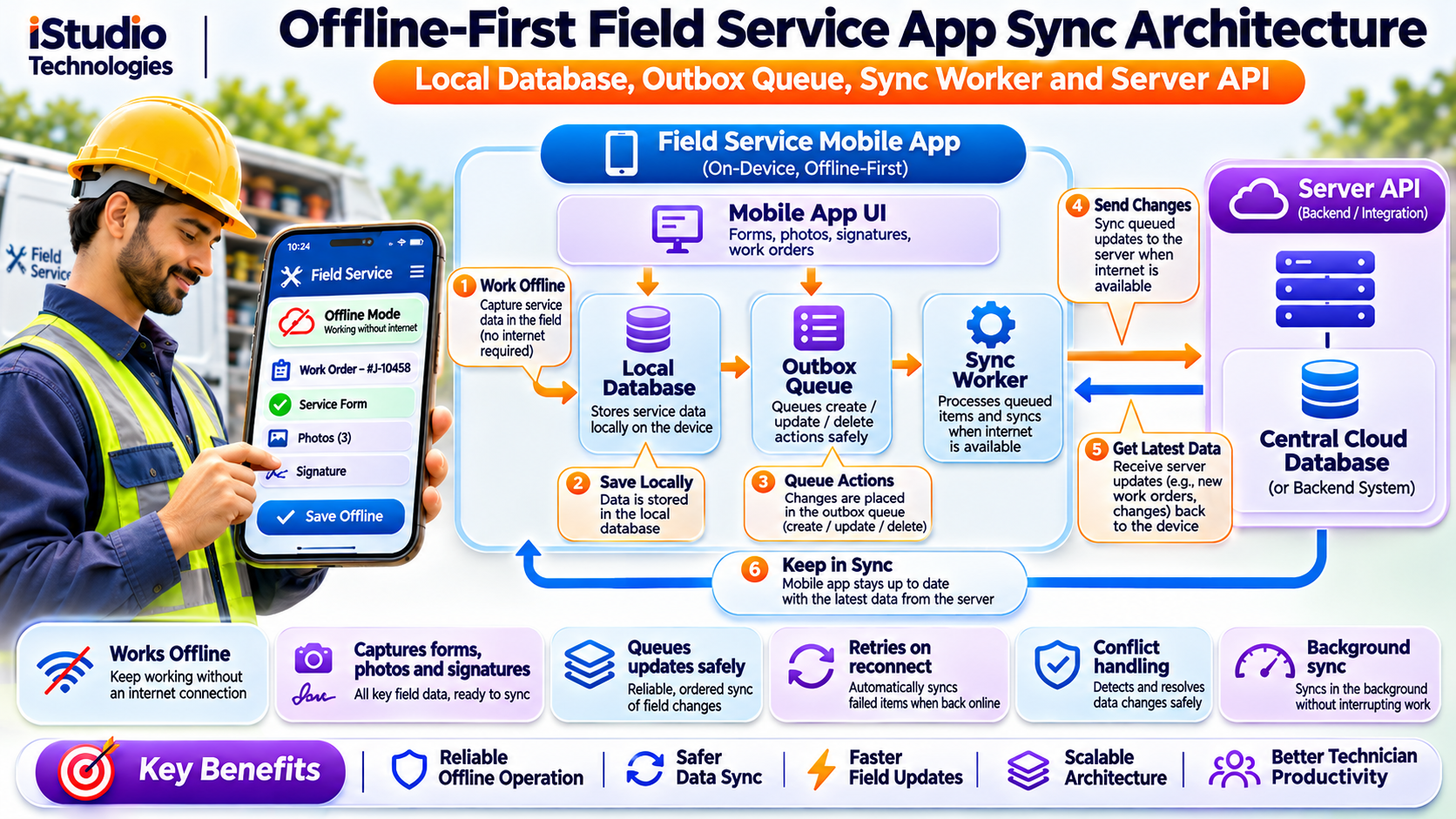
Every change the technician makes is written first to the local database and also added to an outbox table. A sync worker reads the outbox in order and sends each change to the server. When the server confirms, the item is removed. If the app is closed mid-sync, nothing is lost, because the outbox is on disk.
- Write locally first. The screen updates instantly from the local database, whether or not there is a signal.
- Queue the change. Each change carries a unique ID, the record it affects and a timestamp.
- Send with retries. Failed sends are retried with growing delays, so a weak network is not hammered.
- Confirm and clear. Only a server acknowledgement removes the item from the queue.
- Pull updates. The app asks for changes since its last successful sync, rather than downloading everything again.
Make Retries Safe
Retries create duplicates unless the server can recognise a repeat. Give every queued change an idempotency key so that sending the same change twice has the same effect as sending it once. Without this, a technician on a flaky connection can create two invoices for one job.
Decide How Conflicts Are Resolved
Two people can change the same job while offline: a technician closes it while a dispatcher reassigns it. You need a written rule. Last write wins is simple but can silently discard work. Field-level merging keeps both edits when they touch different fields. Server rules decide for sensitive items, such as a completed job that cannot be reopened by a stale update. Choose per data type, and show the user when a conflict needs a human decision.
Other Details That Bite
- Deletes. Mark records as deleted instead of removing them, so other devices learn about the deletion on their next sync.
- Photos and large files. Upload in the background, in chunks that can resume, and compress before sending.
- Clocks. Phone clocks drift and can be changed. Let the server assign order and versions instead of trusting the device time.
- API versions. Old app versions will talk to your server for months. Version your API and have a plan to force an update when needed.
- Visible status. Show an offline badge, a count of waiting changes and the time of the last sync, so technicians trust the app.
Background Work and Device Access
Every flutter vs react native offline app team eventually asks whether the app can sync while closed. The answer depends more on the operating system than on the framework.
Syncing When the App Is Not Open
On Android, Google recommends WorkManager for work that must continue after the app leaves the screen. Its persistent background work guidance says tasks can persist across app restarts and device reboots. On iPhone, the system decides when background work runs and gives apps limited time, so you cannot rely on it for time-critical sync. Both Flutter and React Native reach these features through plugins or small native modules.
A sound design uses three triggers: sync when the app opens, sync when connectivity returns while the app is in use, and best-effort background sync. Add a visible Sync Now button, and never promise technicians that data has reached the office until the server confirms it.
GPS, Camera, Barcodes, Printers and More
Field apps lean on hardware. Both frameworks handle location, camera, barcode scanning, signature capture, Bluetooth and file access through plugins, and both let you write native code when a plugin falls short. Flutter does this through platform channels, and React Native through native modules, which the New Architecture, enabled by default since React Native 0.76, now supports without the old bridge.
- Background location. It drains battery and needs clear permission wording. App stores review its use closely, so collect location only when the job requires it.
- Bluetooth printers and scanners. Models vary widely, so test your exact hardware early. This is a common source of surprises in either framework.
- Offline maps. Caching map tiles uses a lot of storage, so limit the area and the zoom levels, and check the map provider's terms for offline use.
Performance and Testing on Low-End Phones
The honest answer in a flutter vs react native offline app debate is that both can feel fast on good phones and both can struggle on poor ones if the app is built carelessly. Your technicians' real devices matter more than any framework claim.
What Usually Slows a Field App Down
- Loading a long job list in one go instead of paging it from the local database.
- Full-size camera photos kept in memory or uploaded without compression.
- Heavy work on the main thread, such as large sync batches or image processing.
App size is a fair point of comparison too. Flutter bundles its own rendering engine, so a minimal app is often larger to download than a minimal React Native app. Measure your own release builds on your own configuration before letting this decide anything.
The Offline Test Checklist
Test these on a cheap Android phone you would actually hand to a technician, not only on a new flagship.
- Airplane mode from start to finish. Complete a full job, with photos and a signature, with the network off.
- Kill the app mid-sync. Close the app while uploads are running and confirm nothing is lost or duplicated.
- Throttle the network. Test with very slow and dropping connections, not just on or off.
- Fill the storage. See what happens when the phone is almost full.
- Change the clock. Move the date forward and back and watch for sync errors.
- Edit on two devices. Change the same job twice offline, then sync, and confirm your conflict rule works.
- Update with pending changes. Install a new app version while the outbox has items and confirm they still sync.
Team, Hiring and Long-Term Maintenance
For most businesses, the strongest factor in a flutter vs react native offline app choice is the people who will build and maintain the app for years, not the technology on paper.
- Language. Flutter uses Dart, which most web developers need time to learn. React Native uses JavaScript or TypeScript, which many web teams already know.
- Sharing with the web. If you run a React-based admin portal or customer site, React Native can share types, validation rules and some logic. Flutter shares less with web code, though it can target the web separately.
- Hiring. Developers for both are available in India. Ask about people who have shipped offline sync in production, since that experience is rarer than the framework skill.
- Interface control. Flutter draws its own interface, which makes pixel-level consistency across devices easier. React Native uses the platform's native components, which can feel more familiar on each system.
- Upgrades. Both frameworks release often and both need regular upgrades. Budget time every quarter for framework and library updates, or the app will become hard to update.
On cost, the framework choice moves the build budget much less, in our experience, than the scope of sync, offline maps and integrations with your billing or dispatch systems. Ask every vendor to price those items separately, so you can compare like with like.
Whichever you choose, insist on owning the source code, the repositories and the build and release accounts, and keep your backend independent of the mobile framework. That protects you if you change vendors or frameworks later.
Side-by-Side Comparison and a Decision Guide
This summary of the flutter vs react native offline app trade-offs shows where the real differences sit. Anything not listed, such as basic forms, lists and maps, works well in both.
| Factor | Flutter | React Native |
|---|---|---|
| Language | Dart | JavaScript or TypeScript |
| Interface | Draws its own widgets, consistent across devices | Uses native platform components |
| Local database | Mature SQLite options; check each package's upkeep | Mature SQLite options; Realm no longer an option for sync |
| Background sync | Through plugins to WorkManager and iOS tasks | Through libraries to WorkManager and iOS tasks |
| Hardware access | Plugins and platform channels | Libraries and native modules on the New Architecture |
| Web code sharing | Limited | Strong if your web stack is React |
| Base app size | Often larger | Often smaller |
| Offline readiness | Depends on your sync design | Depends on your sync design |
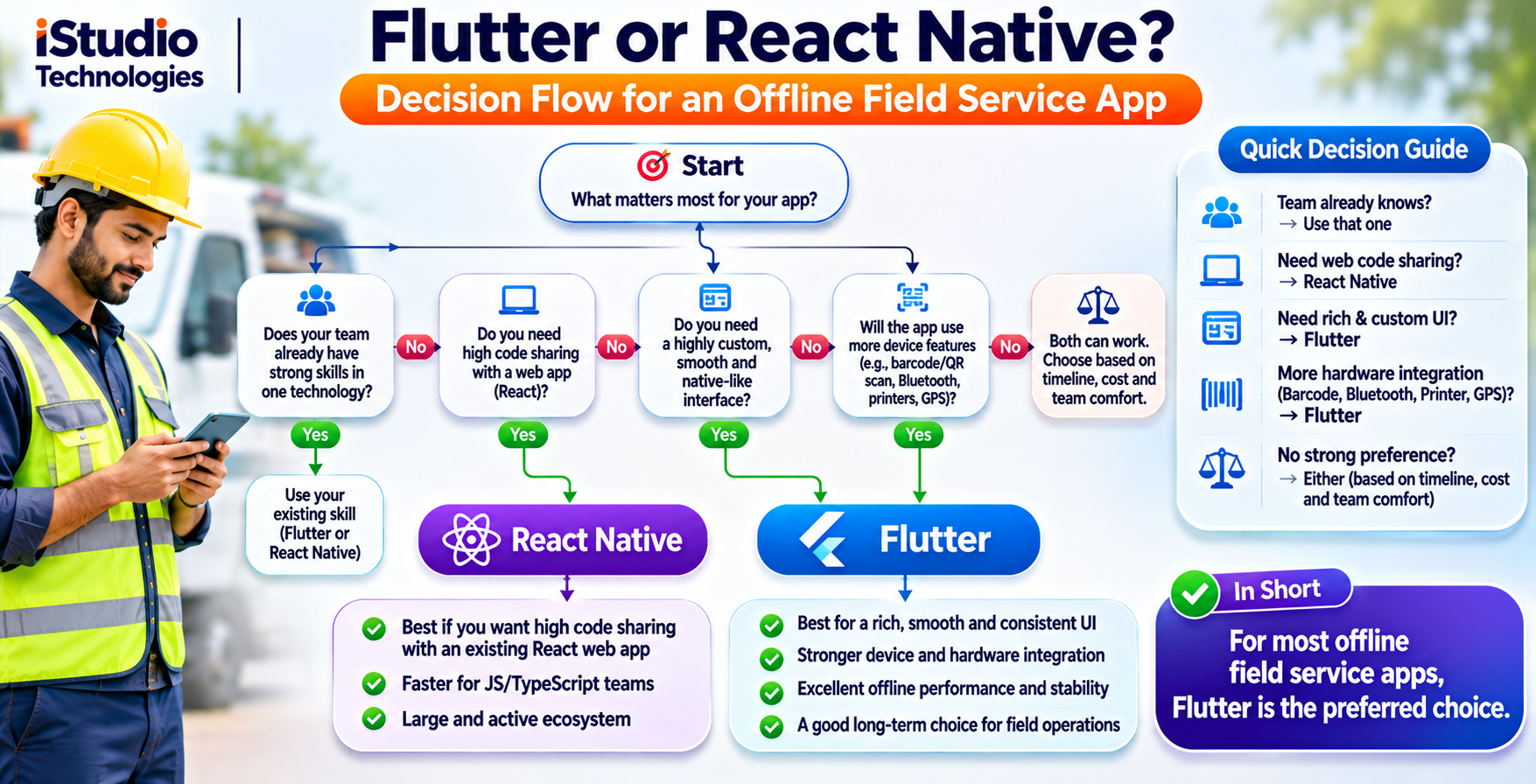
Choose Flutter If
- You want one precisely controlled interface on every phone, including older Android models.
- Your team is starting fresh and is comfortable adopting Dart.
- The app is form-heavy and custom-designed, and does not need to share code with a React web app.
Choose React Native If
- Your developers already know JavaScript or TypeScript and React.
- You want to share validation rules, types and API code with a web portal.
- You value a native look and feel on each platform and a smaller base app size.
Consider Fully Native If
You depend on unusual hardware, target one platform, or need background behaviour that plugins cannot deliver.
Why Build with iStudio Technologies
We are iStudio Technologies, a software, web and mobile company in Valasaravakkam, Chennai, with 17+ years behind us, 500+ projects delivered and an in-house team that handles design, development, QA and support under one roof. We build in both Flutter and React Native, plus native Android and iOS. For a flutter vs react native offline app decision you can trust, that matters: we have no reason to push one framework over the other.
We start with your jobs, devices and sync rules, then recommend a framework and, if you want, build a small prototype of the riskiest part, such as the sync queue or a printer connection, before you commit to the full build. We do not promise a particular speed or a certain number of fewer site visits, because results depend on your processes. We do commit to a clear scope, source code that you own and an app that finishes the job when the network does not.
What We Need from You
Projects start faster when you share a typical technician's day, the forms and checklists in use, your current job and billing systems, the phones your team carries, and the places where the signal fails. A technician who can test early builds is worth more than a long specification.
Want an honest recommendation for your field app? Tell us your users, devices and the jobs that must work offline.
WhatsApp +91 88070 03902Frequently Asked Questions
Which is better for an offline field service app, Flutter or React Native?
Can both frameworks work fully offline?
Which local database should I use?
How should the app handle sync conflicts?
Can the app sync in the background on an iPhone?
Is Flutter or React Native cheaper to build in India?
Does iStudio Technologies build offline-first field service apps?
Related iStudio Technologies Services
More of our work that connects to field service and mobile apps, grouped by what you need next.
Mobile Apps
- Mobile app development company in Chennai, the home for Flutter, React Native and native apps.
Software and Backend
- Software development company in Chennai for sync servers and admin portals.
- Web development company in Chennai for dispatch and customer portals.
Field and Logistics
- Logistics software and mobile app development for drivers and field teams.
- Telematics solution provider in Chennai for vehicle and asset tracking.
Get an Honest Framework Recommendation for Your Field App
Tell us your technicians, their phones and the jobs that must work offline. We will recommend a framework and scope the riskiest part first.
WhatsApp or call +91 88070 03902