
Retail POS Inventory Tech Stack: The Best Choices for a Multi-Branch Retail System
A system for several shops must bill when the internet fails, keep one true stock count and print correct GST invoices. These are the technology choices we recommend for each layer, why, and when to pick something else.
What Is the Right Retail POS Inventory Tech Stack for Many Branches?
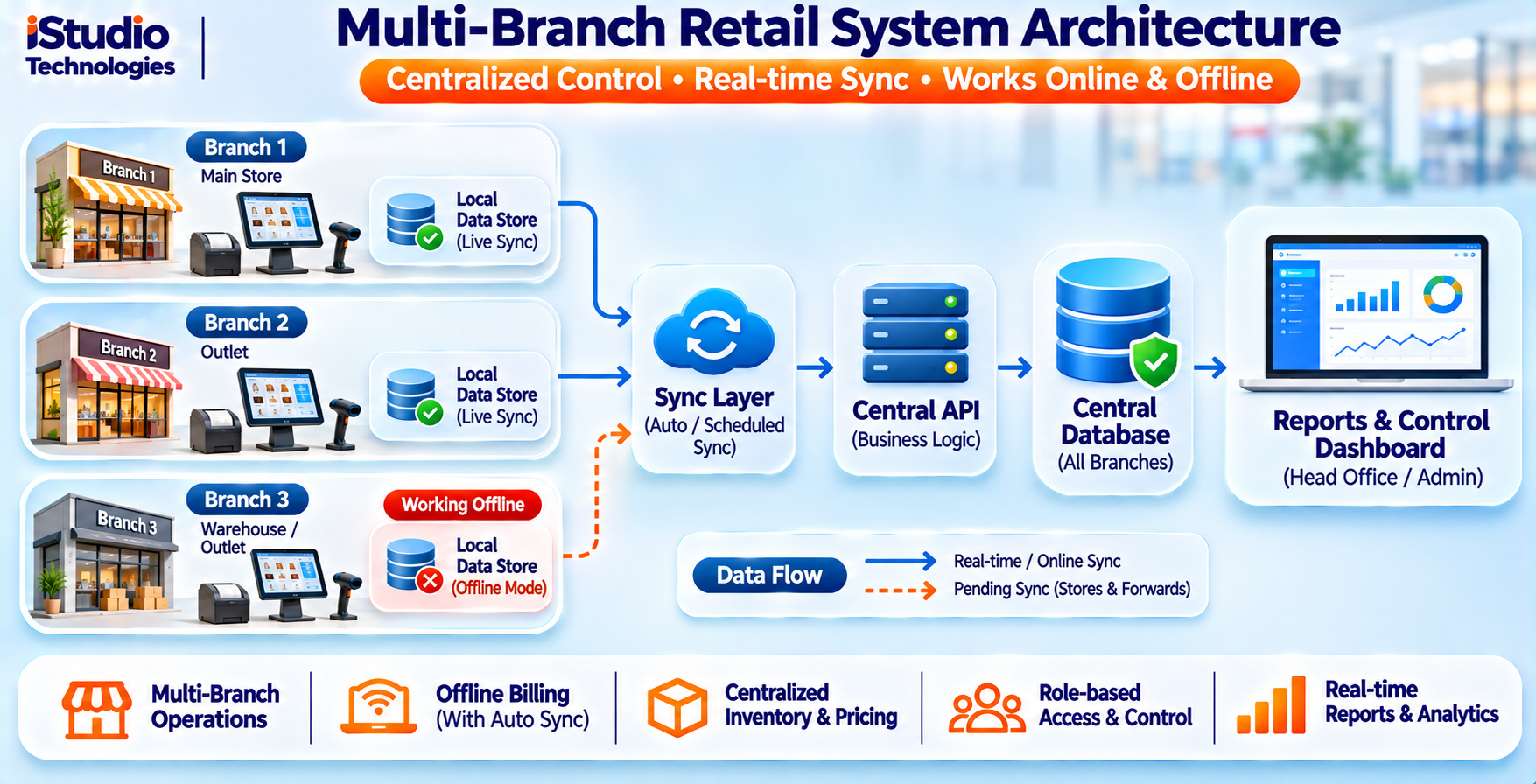
For most multi-branch retailers, we recommend a billing app on each counter that stores data locally and syncs in the background, a central API in front of a PostgreSQL database, and a stock ledger that records every movement as an event. The choices matter less than three design rules: billing never waits for the internet, stock is a history of events and not a single editable number, and every sale carries a unique ID so a retry cannot double-count.
This guide is for owners and technical leads of retail businesses with two or more branches, and for teams scoping such a build. It covers the technology for each layer, with a default choice and a reason to pick something else.
One honest limit: these are our recommendations from engineering judgement and public documentation. We quote no speed, scale or cost figures, because the right numbers depend on your catalogue, branch count and hardware.
How Should You Judge a Stack Before Choosing?
Judge a retail pos inventory tech stack on five questions. Can a counter keep billing with no internet? Is stock always explainable, so you can see why a number changed? Can your team hire for it and maintain it? Does it produce correct GST invoices and branch-wise reports? And can it grow from two branches to twenty without a rewrite?
Fashion matters little. A dull, well-known technology that your team can support for ten years is a better choice than a new one with a small community. We also avoid choices that lock your sales data inside a vendor you cannot leave.
Before you choose anything, check whether a ready-made product already covers you. If your billing, discounts and reports are standard, a packaged tool is usually faster and cheaper. Custom makes sense when your pricing rules, branch workflows or integrations are unusual. Our guide on custom software versus readymade shows how to decide.
The Seven Layers of the Stack
Here is our default for each layer in a retail pos inventory tech stack, and when to choose differently.
Layer 1: The Billing Terminal App
Front endDefault: a cross-platform app built in Flutter for Android tablets and phones, with a Windows or web option if your counters use PCs. Why: one codebase, fast screens for billing and good offline support. Swap-out: React Native if your team already knows JavaScript, or a progressive web app if counters are PCs and installation is hard. We compare the two main choices in Flutter vs React Native for an offline app.
Layer 2: Local Storage on Each Terminal
OfflineDefault: SQLite on the device. Why: it is small, mature and runs everywhere. The terminal keeps the product list, prices, customers and a queue of unsent sales. Rule: every sale is saved locally first, then sent. Swap-out: a different embedded database only if your framework forces it.
Layer 3: The Central API
Back endDefault: a TypeScript service on Node.js (NestJS is a common choice) or a Python service (Django or FastAPI), depending on which your team knows. Why: both are widely used, easy to hire for and well documented. Rule: the API owns the rules for price, tax and stock, and the terminals only apply them. Swap-out: Java or .NET if your company already runs on them.
Layer 4: The Central Database
DataDefault: PostgreSQL. Why: it handles transactions, strict data rules and reporting queries well, and it is open source with no licence fee. Keep money in exact decimal fields and not floating-point numbers. Swap-out: MySQL if your team already runs it. A document database is rarely a good fit for stock, since stock needs transactions and constraints.
Layer 5: Sync and Events
SyncDefault: terminals push sales and stock events to the API over HTTPS, and pull price and catalogue changes. Each event has a unique ID so the server can ignore repeats. Why: simple to build and to debug. Swap-out: add a message queue such as RabbitMQ or Kafka only when you have many branches or other systems that must react to every sale. Do not start there.
Layer 6: Reports and Back Office
InsightDefault: a web admin panel on the same API, with reports run on a read replica or a nightly summary table once data grows. Why: owners need branch-wise sales, stock, returns and GST summaries without slowing down the counters. Swap-out: a separate analytics tool once reporting needs outgrow the app.
Layer 7: Hardware and Integrations
EdgeDefault: standard barcode scanners that act as a keyboard, thermal receipt printers on USB or Bluetooth, and a payment option that matches how your customers pay, including UPI. Rule: test the exact printer and scanner models you will buy, before you finish the app. Swap-out: weighing scales, label printers and accounting export as phase two or three needs.
| Layer | Our default | Pick something else when |
|---|---|---|
| Terminal app | Flutter | Your team knows React Native, or counters are PCs |
| Local storage | SQLite | Your framework needs another embedded database |
| Central API | Node.js (NestJS) or Python | Your company already runs Java or .NET |
| Central database | PostgreSQL | Your team already runs MySQL |
| Sync | HTTPS with unique event IDs | Many branches or systems must react to each sale |
| Reports | Web admin on the same API | Reporting needs outgrow the app |
| Hardware | Keyboard-style scanners, thermal printers | You need scales or label printing |
iStudio recommendations for a typical multi-branch retailer. Not benchmarks. This summary is our retail pos inventory tech stack default.
iStudio Engineering Note: Treat Stock as a Ledger of Events
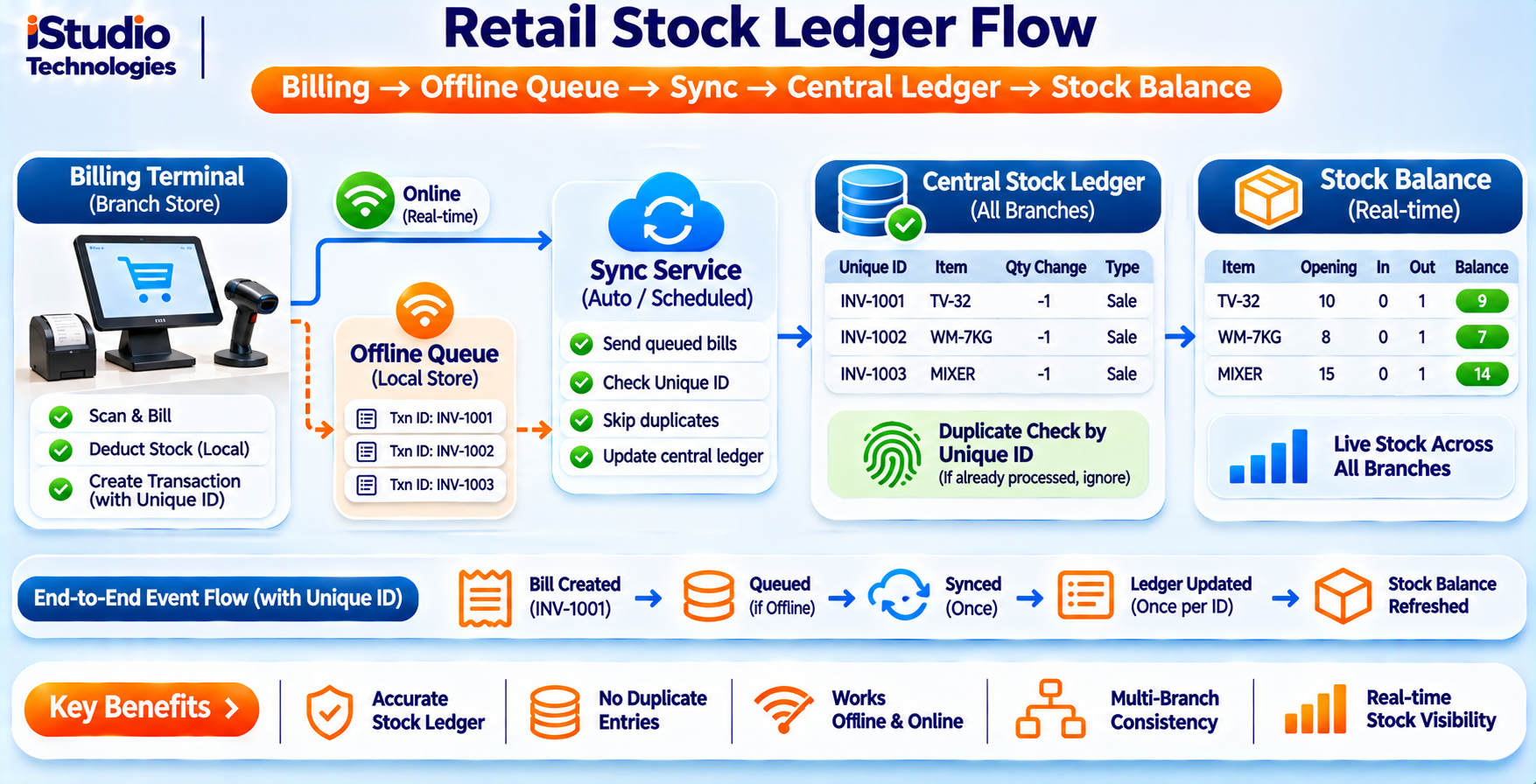
The most common design mistake in a retail pos inventory tech stack is storing stock as one number per product per branch and editing it directly. When two counters and a stock-take touch the same number, one change overwrites another and nobody can say why the count is wrong. A safer design keeps a ledger.
- Record events, not totals. Every sale, return, purchase receipt, transfer and stock-take adjustment becomes a row in a stock ledger with branch, product, quantity change, time, user and reason.
- Derive the count. Current stock is the sum of the ledger for that branch and product. For speed, keep a cached balance that the system updates in the same database transaction as the ledger row.
- Give every event a unique ID. The terminal creates the ID when the sale happens. If the sale is sent twice because the network dropped, the server sees the same ID and stores it once.
- Number invoices per branch and series. Give each branch its own invoice series, assigned on the terminal, so branches never wait for each other and numbers do not collide. Confirm the numbering format with your accountant.
- Handle conflicts openly. If a branch sells a unit that the system thinks is gone, accept the sale, record it and show a stock exception to a manager. A counter should not refuse a customer standing in front of it.
- Make transfers two-step. A transfer has a sent event at the first branch and a received event at the second, so stock in transit is visible.
This design costs a little more to build than a single number, and it makes audits, returns and shrinkage investigations far easier, because every change is traceable.
Which Rules Should the Stack Plan For?
This is general guidance and not legal or tax advice. Rules and thresholds change, so confirm each point with your accountant.
- GST invoices. Your retail pos inventory tech stack must print invoices with the details your accountant specifies, with correct tax by item and a continuous numbering series. Store tax rates as data you can change, not as values in code.
- QR codes and e-invoicing. A GST Council circular on the dynamic QR code for B2C invoices says it applies from 1 December 2020 to taxpayers above a very high turnover limit, under Notification 14/2020-Central Tax. E-invoicing duties depend on turnover and have changed over time, so ask your accountant which apply to you, and build the system so these can be switched on later.
- Customer data. India's Digital Personal Data Protection Rules were notified in November 2025, according to a Press Information Bureau release, and are being phased in. If you store customer names and phone numbers for loyalty or receipts, collect only what you need, ask consent and limit who can see it.
- Access and audit. Give each role only the access it needs, such as cashier, branch manager and owner, and log price changes, discounts, voids and stock adjustments with the user and time. Do this for your own protection against loss and error.
- Records. Keep invoices and the stock ledger for the period your accountant advises, and back up the central database on a schedule you have tested by restoring.
How Should You Phase the Build?
Do not build everything at once. Prove billing and stock in one or two branches first, then widen. A phased plan keeps the retail pos inventory tech stack small while you learn what your counters really need.
| Phase | Scope | Proof before moving on |
|---|---|---|
| 1: One branch | Billing terminal, local storage, central API and database, product and price management, GST invoice, basic stock ledger, daily sales report | The branch bills through a real internet outage and the stock count matches a physical check |
| 2: Several branches | Branch invoice series, transfers, stock-take, roles and audit log, branch-wise reports, purchase receipts | Two branches sell the same item and a transfer completes with no unexplained difference |
| 3: Growth | Loyalty, online orders, accounting export, scales and label printers, queue or analytics tools if needed | Each addition has a named owner and a measured need |
If you want a team to scope and build this, our software development team in Chennai can map the stack to your branches and hardware. For budgeting a billing build, see our guide to GST billing software development cost in Chennai.
Planning a multi-branch POS and inventory system? Tell us your branches, catalogue size and hardware, and we will suggest a first release.
Discuss Your Retail SystemCommon Questions
Which database is best for a retail POS?
What happens when a branch loses internet?
Should I build custom software or buy a ready-made POS?
How do branches avoid invoice number clashes?
Do I need a message queue from the start?
Scope Your Multi-Branch Retail System
Share your branches, catalogue size and hardware. We will suggest a stack, a phased plan and a first release.
Discuss Your Retail System