
Recover Rankings After Website Redesign: A Recovery Plan for a Chennai Website
A new design can bring a drop in enquiries when search engines can no longer find or understand what used to rank. Most causes are fixable. Here are eight steps to confirm the drop, find the cause, fix it in the right order and watch the result, without guessing.
Recover Rankings After Website Redesign: What Should You Do First?
First confirm that rankings really dropped and note the date. Then check the quickest, most damaging causes: a leftover noindex tag or robots block from the test site, old URLs that now return errors instead of redirecting, and pages whose content was cut. Fix those before touching anything else, and write down every change with its date so that you can tell what helped.
This guide is for owners and marketers of Chennai businesses whose enquiries fell after a new website went live. You do not need to be technical to follow the steps, though some fixes will need your developer.
An honest limit: we cannot promise that every ranking returns, or how fast. Sometimes a redesign removes content or pages that earned the traffic, and the best result is a partial recovery. The steps below find out which situation you are in.
Why Do Rankings Drop After a Redesign?
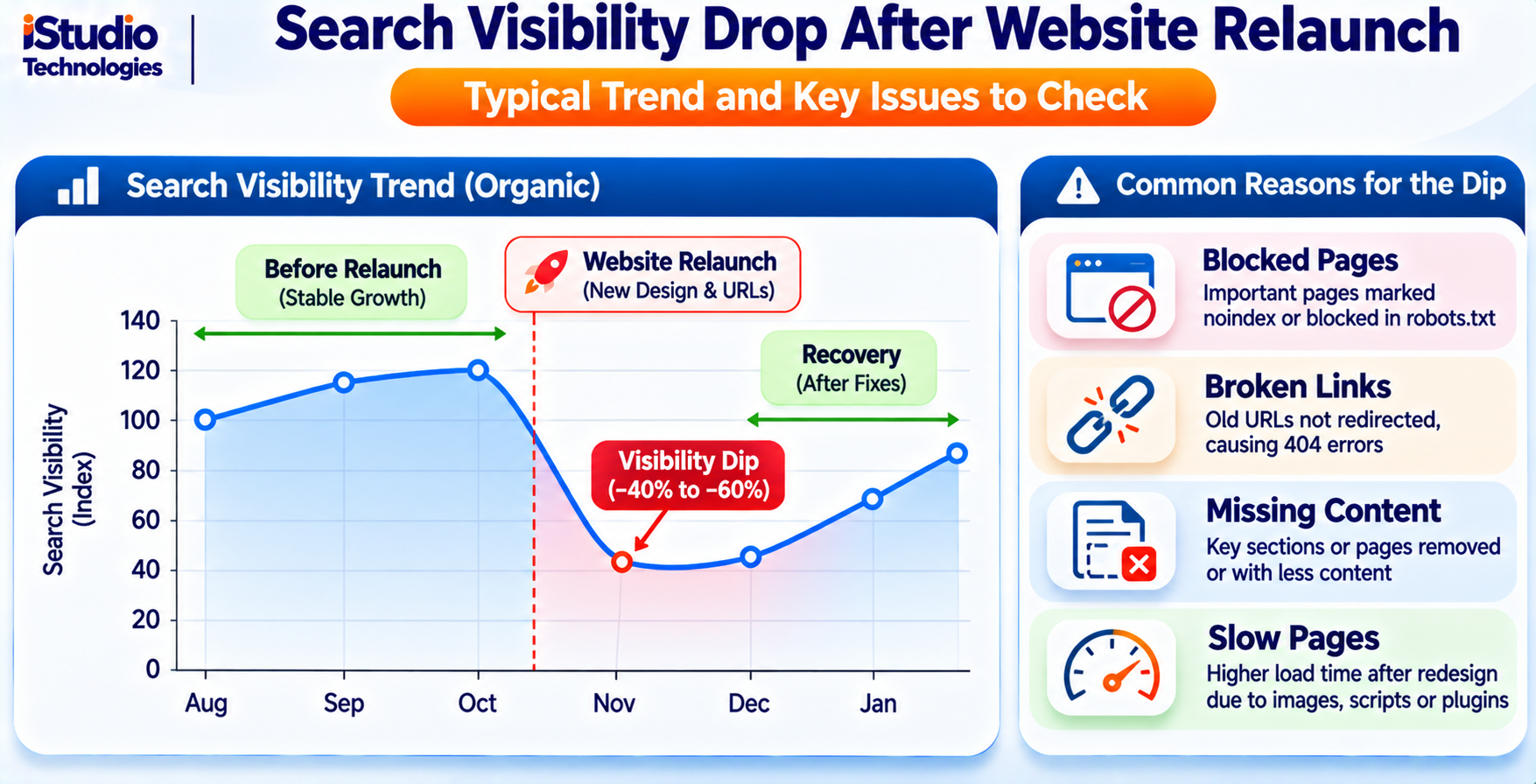
A search engine knows your site by its web addresses, its content and the links between pages. A redesign can change all three at once. To recover rankings after website redesign work goes wrong, you need to know which of these changed.
- Addresses changed without redirects. Old pages that ranked now return a not-found error, so their standing is lost.
- Test-site settings went live. A tag or file that told search engines to stay away from the staging site was copied to the live one.
- Content was cut or rewritten. The new design favours short text, and the words that matched searches were removed.
- Links between pages disappeared. A new menu leaves important pages with few or no links pointing to them.
- The site got slower or harder to use on phones. Large images, heavy scripts and sliders can make pages slow.
- Local signals broke. The Google Business Profile still points to an old address, or local and area pages were removed.
Some drops are not caused by the redesign at all. Seasonal demand, a competitor's improvement or a change in how search results are shown can also move traffic, which is why the first step is to check the facts.
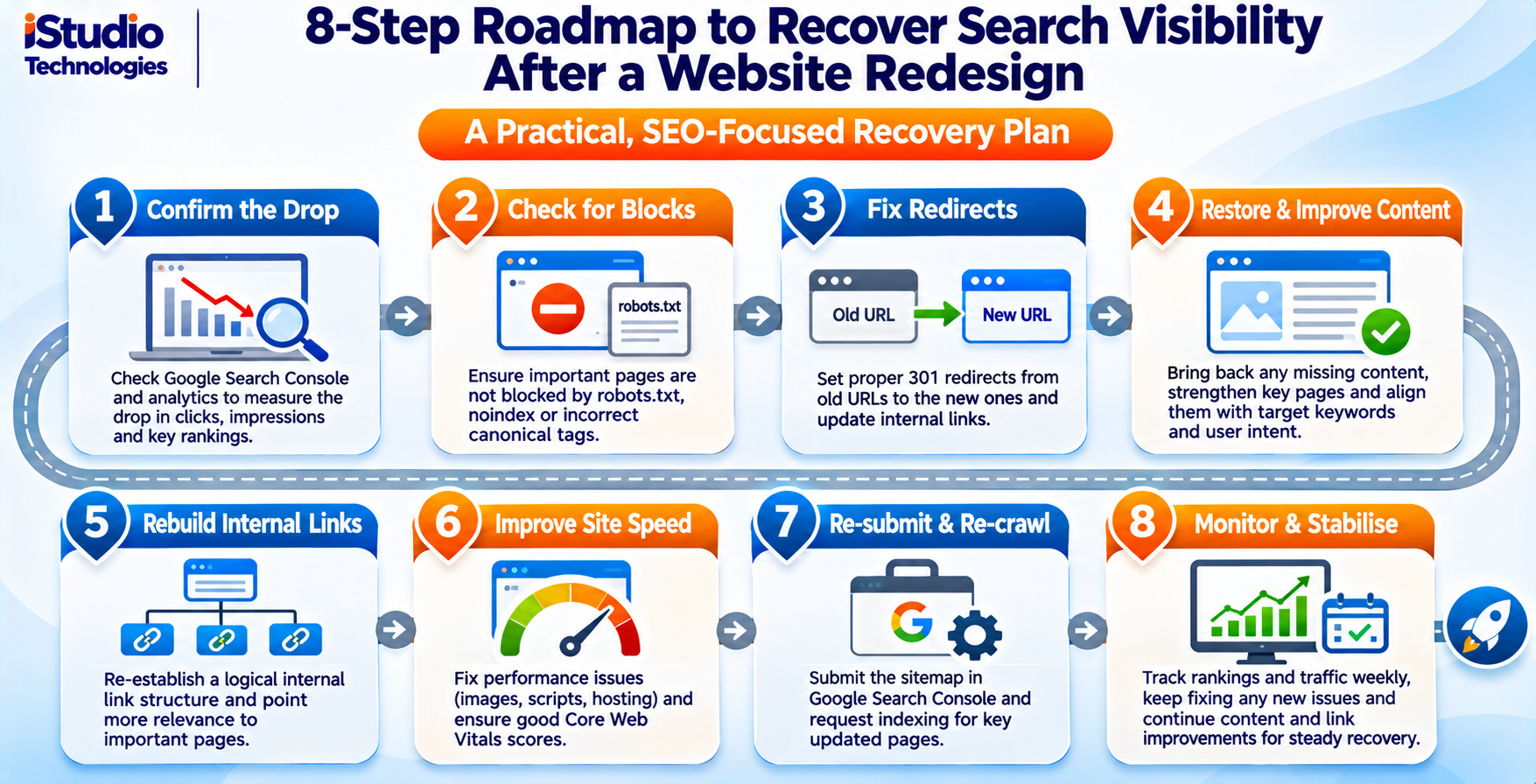
The Eight Steps to Recover Rankings After Website Redesign
Step 1: Confirm the Drop Is Real
DiagnoseOpen Google Search Console and compare the weeks before and after launch. Google's help page Why did my site traffic drop? notes that mixing up http and https is probably the most common reason for apparently missing traffic, since you may be looking at the wrong property. Check that you are viewing the property that matches the live address, including the www version, and check Google's data anomalies page for known reporting issues.
Output: a dated note of clicks, impressions and average position before and after, for the whole site and for your ten most important pages.
Step 2: Look for Blocks Left from the Test Site
Quick winCheck the live pages for a noindex instruction, check the robots file for a rule that blocks the whole site, and check that each page's canonical tag points to the live address and not to a test address. Also confirm that no password or login protection is still on.
Output: a yes or no for each check. A single leftover block can explain a sudden, site-wide fall, so this comes before everything else.
Step 3: List Every Old Address That Mattered
InventoryBuild the list of old pages that earned traffic or links. Use the last twelve months of Search Console data for pages, your analytics, your old sitemap and a backup of the old site. Include blog posts, service pages, area pages and landing pages.
Output: one list of old addresses with their clicks, so that you know where the traffic used to land.
Step 4: Check and Rebuild the Redirects
Highest impactTest each old address from Step 3. It should lead, in one step, to the closest equivalent new page with a permanent (301) redirect. Google's guide on site moves and migrations covers moves where URLs change, including preparing a URL mapping and setting up redirects. Do not send everything to the home page, because a search engine treats that as a poor match.
Output: a completed redirect sheet (see the engineering note) and a list of fixes for the developer.
Step 5: Restore Content That Used to Rank
ContentFor each of your top old pages, compare the old text, headings, title and meta description with the new page. If a page lost the explanation that matched what people searched for, put back the useful content in the new design. Restore service details, prices or ranges you used to show, FAQs and location information. You do not need to copy the old page exactly, and you do need the same substance.
Output: a list of pages with the content gaps and the text to restore.
Step 6: Repair Internal Links and the Menu
StructureCrawl the new site and look for important pages with few internal links, or none. Add links from the home page, the menu, related pages and blog posts. Check that links inside the pages point to the new live addresses and not to old ones that redirect.
Output: a list of orphan or weakly linked pages and the links to add.
Step 7: Check Speed and Mobile Use
ExperienceTest your key pages on a phone over a mobile connection. Compress images, remove heavy sliders and scripts you do not need, and fix layouts that break on small screens. Our guide to website speed optimisation in Chennai explains the common fixes.
Output: a short list of speed and mobile fixes, ranked by the pages that matter most.
Step 8: Fix the Local Signals, Then Monitor
Local and watchUpdate your Google Business Profile website link, check that your name, address and phone number match across the site and directories, and restore any area or service pages that were removed. Then submit your sitemap in Search Console, request indexing for the most important pages, and review the data every week, using the same dated notes as Step 1. For help with the profile, see why a business is not showing in the Google map pack.
Output: a weekly log of what changed, what was fixed and how clicks and positions moved.
Which Symptom Points to Which Cause?
Use this table to decide where to look first when you recover rankings after website redesign problems. It is a guide from our experience, and a real site can have more than one cause at once. Google's guide to debugging search traffic drops describes how to tell a small drop in position from a large fall in impressions and what to check in each case.
| What you see | Likely cause | Check first |
|---|---|---|
| Almost every page fell on the launch date | Site-wide block or wrong canonical | Noindex tag, robots file, canonical tags, login protection |
| Pages that used to rank now show errors | Missing or wrong redirects | Old address list tested one by one |
| Pages are live but lost positions for key searches | Content, title or heading changes | Old and new page text side by side |
| Good pages exist but rank lower and fade over weeks | Weak internal links or slow pages | Crawl for orphan pages; mobile speed test |
| Map listing and local searches fell | Profile link, address details or removed local pages | Business Profile website field; area pages and contact details |
iStudio diagnostic guide, not measured data. Always confirm with your own Search Console and crawl results.
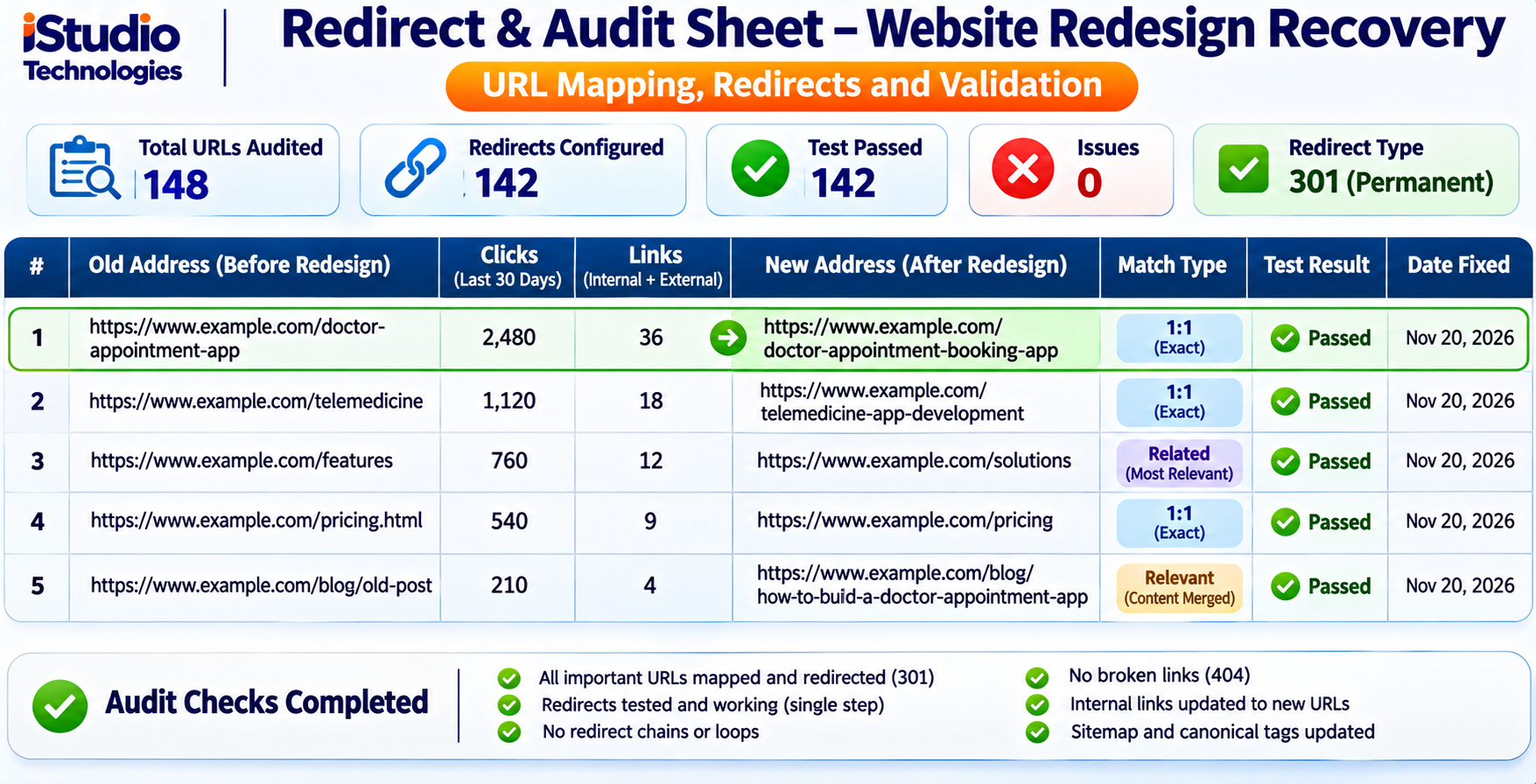
iStudio Engineering Note: Keep One Redirect and Audit Sheet
The most useful tool for anyone trying to recover rankings after website redesign work is a single spreadsheet that records every old address and what happened to it. It turns a vague worry into a checklist.
- One row per old address. Columns: old address, clicks in the last twelve months, whether it had links from other sites, the new address, the type of match and the test result.
- Match by intent. Send each old page to the new page that answers the same need. If there is no equivalent, decide whether to build one or to let the old address return a not-found error, and write the reason.
- Use one permanent redirect per address. Avoid chains in which one address redirects to another that redirects again. Point each old address straight to its final page.
- Test with a crawler and by hand. Run the old list through a crawler that reports the status of each address, then open your top twenty on a phone.
- Keep the redirects. Google's migration guidance advises keeping redirects in place for as long as you can. Do not remove them after a few weeks.
- Log the date of every fix. Next to each repair, record the date it went live, so that a later change in clicks can be traced to it.
The sheet takes a few hours to build for a small business site and saves days of argument later. It also protects you when the next redesign is planned.
What Should You Avoid, and How Long Does Recovery Take?
When you set out to recover rankings after website redesign changes, some well-meant moves make things worse.
- Redirecting everything to the home page. It loses the match between the old page and its topic.
- Changing addresses again. A second round of URL changes adds a new problem to the first.
- Changing many things at once. If you fix five things on one day, you will not know which one worked.
- Buying links or using shortcuts. They can bring penalties and do not repair the real cause.
- Deleting the old site's content. Keep a full backup of the old pages until the recovery is complete.
Should You Roll Back to the Old Site?
Consider it when the drop is severe, the cause is not found quickly and the old site can be restored without loss of data or sales. A rollback can stop the damage while you fix the new site on a test copy. Talk to your developer about what a rollback would lose, such as new orders or forms, before you decide.
How Long Does Recovery Take?
There is no fixed time and we will not quote one. It depends on the size of your site, how severe the cause was and how quickly the fixes go live. Fixing a block or a missing redirect can show results soon after search engines revisit the pages, and content and link repairs take longer. Track weekly and judge by the trend.
If you want a team to run these checks for you, our SEO services in Chennai include a post-redesign audit, redirect mapping and monitoring.
Lost enquiries after a relaunch? Send us your old and new addresses, and we will tell you where to look first.
Request a Redesign SEO AuditCommon Questions
How do I know whether the redesign caused the drop?
Will redirects bring my old rankings back?
Should I request indexing for every page?
Can a new design hurt rankings even if URLs stay the same?
When should we call an SEO team?
Find Out Why Your Rankings Fell
Send us your old and new addresses and your Search Console access. We will run the checks in this guide and tell you what to fix first.
Request a Redesign SEO Audit