
B2B Order Booking App Textile Features: What Wholesalers Need
Textile orders are not like other orders. A buyer picks a design, a shade and a quantity in meters, pieces or sets, at a price that is agreed for that buyer alone. Here are the ten features an ordering app needs, in the order we would build them, and the textile details that general apps miss.
B2B Order Booking App Textile Features: What Does a Wholesaler Need?
A textile wholesaler's ordering app needs a private design-wise catalogue, prices set for each buyer, quantities in the units the trade uses, a cart that handles shades and sets, live stock, credit control, and a clean handover to dispatch and invoicing. The app should also fit the way buyers already work, which usually means WhatsApp stays in the loop.
This guide is for owners and managers of textile wholesale, manufacturing and distribution businesses, and for teams scoping an app for them. It lists the features in the order we would build them, so a small business can start with the parts that remove the most errors.
An honest limit: this is our recommendation from engineering judgement and public information about how these apps work. We give no cost, speed or adoption figures, and your trade may have habits that differ, so check each feature against how your own buyers order.
How Do Textile Orders Work Today, and What Breaks?
Most wholesalers still take orders through calls, photos and chat messages. Listing the problems first shows what a b2b order booking app textile buyers will actually use must fix.
- Photos without structure. A buyer receives dozens of images with no design number, shade list or price, then replies with a message that someone must interpret.
- Stock mismatch. A design is promised twice because stock sits in a notebook, a spreadsheet or someone's memory.
- Price confusion. Each buyer has an agreed rate, and the wrong rate on an order starts an argument later.
- Credit surprises. An order is accepted from a buyer whose payment is already overdue.
- Re-typing. The same order is written in chat, then in a register, then in the billing software.
These are common patterns, and your business may have others. Write down your own five worst order mistakes before you design anything, and make sure each one has a feature that prevents it.
The Ten Features of a B2B Order Booking App Textile Wholesalers Can Use
Feature 1: A Private Design-Wise Catalogue
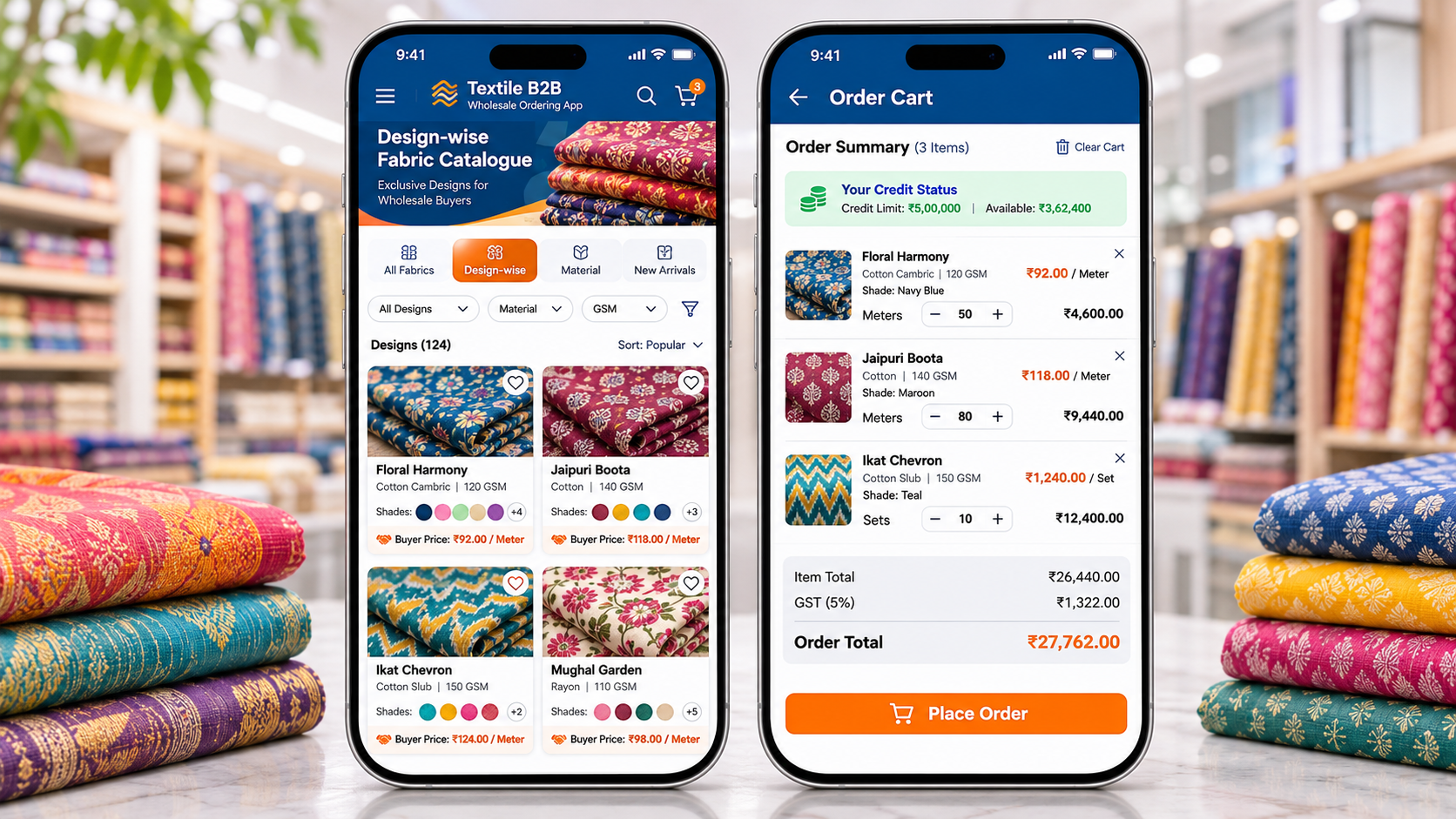
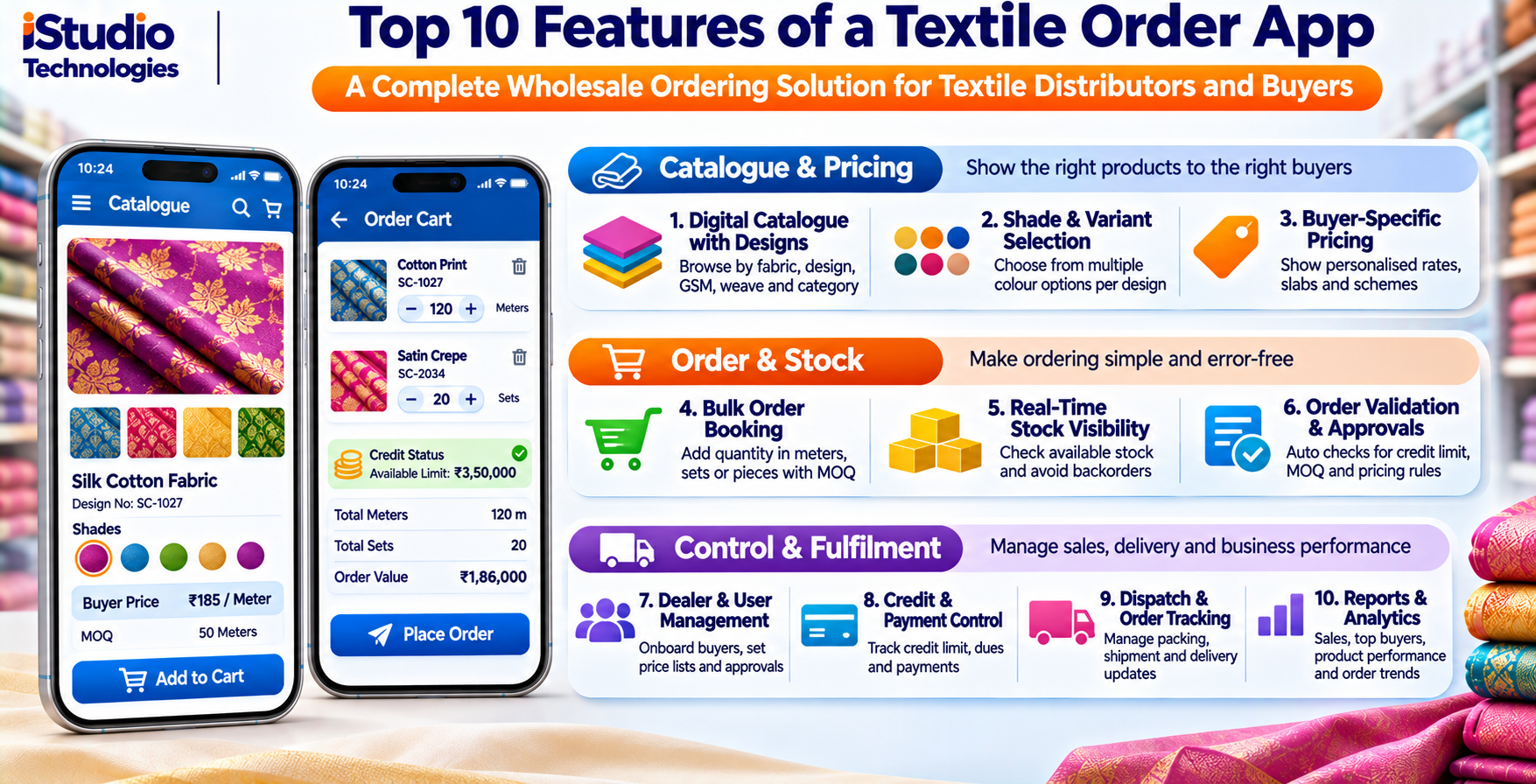
CatalogueEach design needs a number, clear photos, fabric type, width, weight or quality grade, available shades, unit and minimum order. Buyers should see the catalogue only after you approve them, because wholesale prices are not for the public.
Build: categories, search by design number, a new arrivals list, and a quick way for your staff to upload many designs at once. Avoid: a gallery with photos and no design numbers.
Feature 2: Buyer-Wise Prices and Approved Access
PricingA buyer should see only their own price. Prices may come from a price list, a discount slab or a special rate for one design.
Build: buyer accounts that you approve, price lists assigned to groups or single buyers, and a rule that decides which price applies when several could. Avoid: showing one public price and negotiating by chat.
Feature 3: The Units the Trade Uses
UnitsTextile quantity is not always a simple count. Depending on the product, orders may be in meters, pieces, sets, bundles or full rolls, and the buyer may think in one unit while you stock in another.
Build: a unit and conversion setting for each design, minimum order quantities and quantity slabs, and rounding rules. Confirm every conversion with your own team, because trade customs differ by product and region.
Feature 4: A Cart That Understands Shades and Sets
Order entryA buyer often wants several shades of one design in set proportions, or a mixed assortment. A plain quantity box cannot capture that.
Build: a shade-wise quantity grid, saved assortments the buyer can reuse, a note field for the buyer's own reference, and an order summary that the buyer can send on to the team that approves it.
Feature 5: Live Stock and Holds
StockShowing stock stops overselling, and it works only if the app and your godown agree. Stock needs a rule for what happens between a buyer adding an item and the order being confirmed.
Build: available stock by design and shade, a reservation when an order is confirmed, a clear message when stock is short, and a way to offer a substitute shade. The engineering note below explains the design.
Feature 6: WhatsApp in the Loop
Fit with habitsMany buyers already live in chat, so an app that ignores it will be skipped. Let buyers share a catalogue link, send an order summary to your number and receive order updates in chat.
Build: share links for designs and the whole catalogue, an order message with a clean summary, and status messages through the official platform with the buyer's consent. Our guide to WhatsApp marketing cost in Chennai explains charges and consent.
Feature 7: Credit Limits and Outstanding
ControlWholesale runs on credit, so the app should know each buyer's terms. It should warn your team, and the buyer, before an order that breaks them.
Build: a credit limit and payment terms for each buyer, outstanding and overdue amounts from your accounts, and an approval step for orders above the limit. Avoid: hard-blocking buyers automatically without a manager's override, since relationships matter.
Feature 8: Order Approval, Dispatch and Transport Details
FulfilmentAfter an order is placed, someone must approve it, pick and pack it, and send it with a transporter. Buyers then ask where their goods are.
Build: order statuses from received to approved, packed and dispatched, the transporter's name and the transport receipt number, and a simple status page for the buyer. Partial dispatch needs support, because one order often goes in more than one lot.
Feature 9: GST Invoice and Billing Handover
ComplianceThe order should flow into your billing without typing it again, and the invoice should carry the details your accountant requires.
Build: an export or a direct link to your billing or accounting software, invoice numbering handled in that system, and tax rates held as data and not typed into the app. For budgeting a billing build, see our guide to GST billing software development cost in Chennai.
Feature 10: Agent and Salesperson Mode, with Reorders
ReachSome buyers order through your own salespeople or through agents who visit them. The same app should let an agent book an order for a buyer, even with a weak network, and should make reordering last season's assortment quick.
Build: an agent login that sees only assigned buyers, offline order saving, and a reorder button on past orders. Our guide to field sales tracking app cost covers the field side in more detail.
iStudio Engineering Note: Model Designs, Shades and Stock Carefully
The most common technical mistake in a b2b order booking app textile project is treating a design as one product with one stock number. In textiles a design has shades, widths or sizes, and units that convert. A safer model separates these.
- Design, variant and unit. A design holds the description and photos. A variant is one design in one shade (and width or size where it matters). Stock, price and orders attach to the variant, and each variant has a base unit with conversions to the others.
- Prices as rules, not numbers. Store price lists and buyer assignments, and calculate the price when the order is created. Save the price that applied on the order line, so a later list change does not rewrite history.
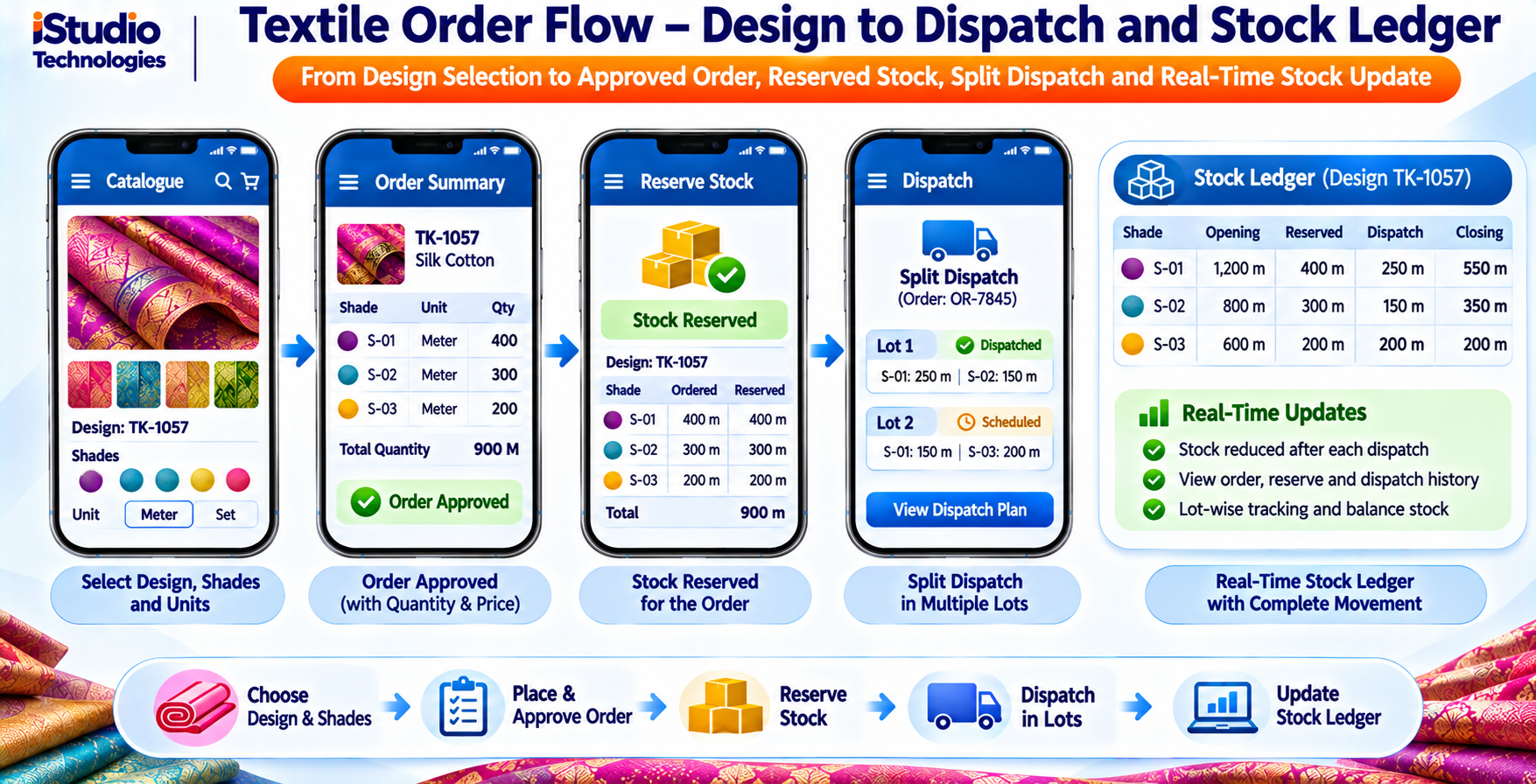
- Reserve stock at confirmation. Adding to the cart reserves nothing. When your team approves an order, the system reserves stock for that variant and shows it as committed. A reservation that is not dispatched within a set time returns to a manager's attention.
- Keep stock as a ledger. Record receipts, reservations, dispatches, returns and adjustments as events and derive the balance, as we describe in our guide to the retail POS inventory tech stack.
- Give every order a unique ID at the device. If a weak network makes the app send an order twice, the server stores it once.
- Split dispatches cleanly. One order line can ship in several lots. Track the dispatched and pending quantity for each line, and close the order only when each line is complete or cancelled with a reason.
This takes more design than a simple form, and it prevents the double promises and price disputes that spoil trade relationships.
Which Rules and Policies Affect the App?
This is general guidance and not legal or tax advice. Rules and thresholds change, so confirm each point with your accountant. The b2b order booking app textile wholesalers choose should let you change rules without a rebuild.
- GST invoices. Invoices must carry the details your accountant specifies, with the correct tax by item. Keep tax rates and the invoice format as settings in your billing system, and let the app pass clean order data to it. We state no rate here.
- E-way bill. The GST Council's flyer on the e-way bill describes it as required, under Rule 138 of the CGST Rules, for the movement of goods above a stated consignment value, shown there as ₹50,000. That material is older, so check the current rules and exemptions for textiles. Ask your team whether dispatch screens should capture the details your accountant needs for it.
- Buyer data. India's Digital Personal Data Protection Rules were notified in November 2025, according to a Press Information Bureau release, and are being phased in. Buyer names, phone numbers and credit details are personal or sensitive business data, so limit who can see them and keep them secure.
- WhatsApp messages. Send order updates and offers only to buyers who agreed to receive them, and follow WhatsApp's business messaging policy. Keep a record of each buyer's consent.
- Price confidentiality. Buyer-wise prices are commercial secrets. Use approved logins, hide prices from the public, and log who changed a price list and when.
What Should Launch First and What Can Wait?
A small wholesaler does not need all ten features on day one. This order follows how much each feature reduces order errors, and it keeps the first release small enough to finish. It is the order we would suggest for any team starting a b2b order booking app textile project.
| Feature | When | Reason |
|---|---|---|
| 1. Private design-wise catalogue | Launch | Replaces unstructured photos |
| 2. Buyer-wise prices and approved access | Launch | Prevents wrong-rate disputes |
| 3. Units the trade uses | Launch | A wrong unit ruins the order |
| 4. Shade and set cart | Launch | Captures the real order |
| 5. Live stock and holds | Launch | Stops double promises |
| 6. WhatsApp in the loop | Launch | Fits how buyers already work |
| 9. GST invoice handover | Soon | Removes re-typing into billing |
| 8. Approval, dispatch and transport details | Soon | Answers where is my order |
| 7. Credit limits and outstanding | Soon | Needs accounts data connected first |
| 10. Agent mode and reorders | Later | Builds on a stable core |
If you want a team to scope this for your business, our mobile app development team in Chennai can map your designs, units, buyers and billing to a first release.
Planning an order booking app for your textile business? Share your products, units, buyers and billing software, and we will suggest a first release.
Discuss Your Order AppCommon Questions
Can buyers order through WhatsApp and the app together?
How should prices differ for each buyer?
What if the stock in the app is wrong?
Should we build an app or use a ready-made catalogue tool?
Does the app need to work without internet?
Plan Your Textile Order Booking App
Share your products, units, buyers and billing software. We will suggest a first release and a phased plan.
Discuss Your Order App